

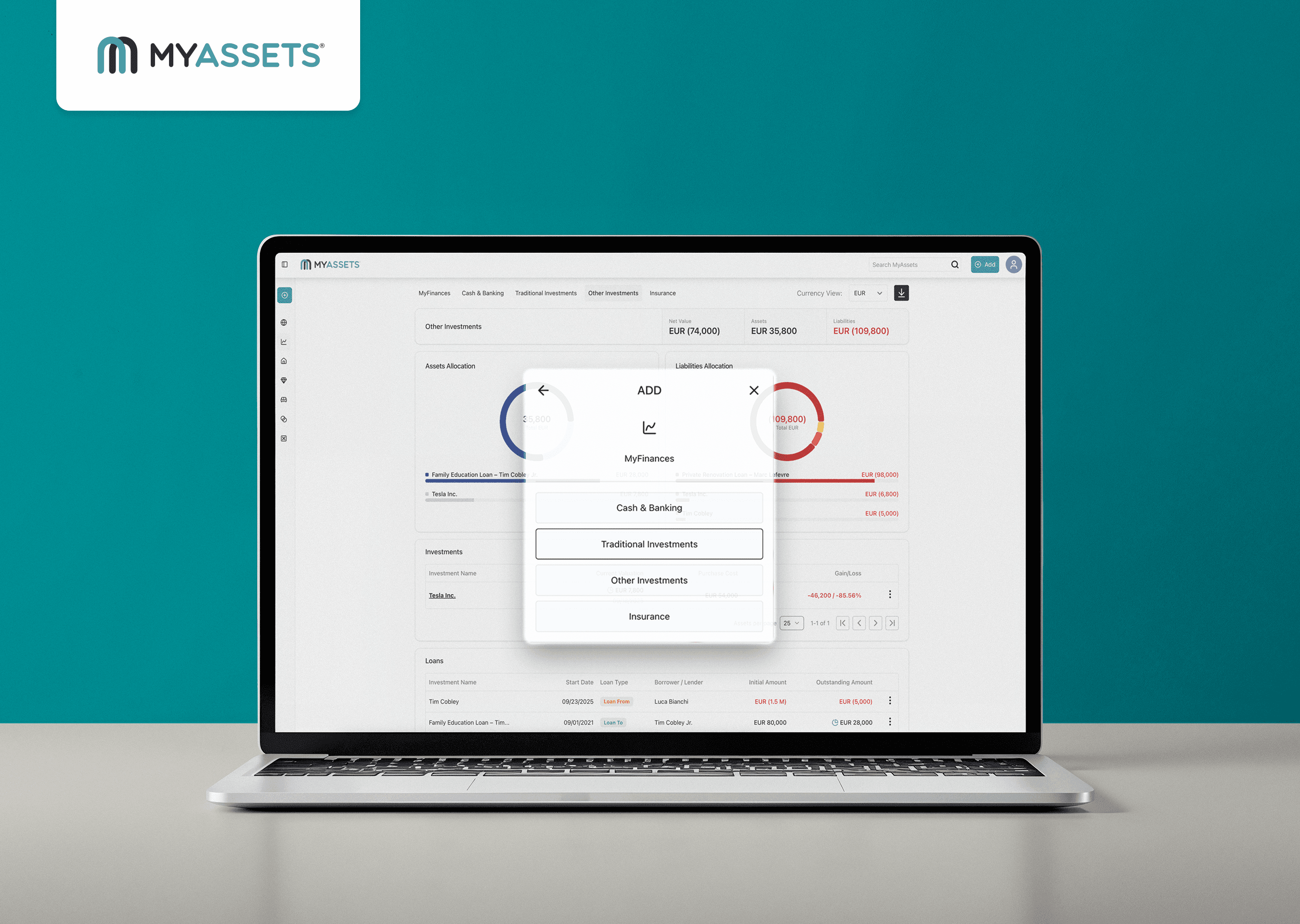
Investment portfolio monitoring is crucial in getting a clear picture of your financial assets and their performance. By having a clear understanding of your financial assets, you can respond proactively to market changes and pivot accordingly to continue meeting your goals.
As your investment grows and diversifies across stocks, bonds, cryptocurrencies, and other asset classes, it can be challenging to keep everything balanced as data becomes complex and data-intensive. Consolidating financial data for all of these assets into a single view can help you assess net worth accurately, manage risk, and make strategic decisions aligned with long-term objectives. Tools that centralise finance data make it easier to track performance, spot emerging issues, and adjust strategies before small problems turn into significant losses.
This begs the question: What are the challenges that come from using the wrong investment management software?
Common issues with asset management include:
- A lack of real-time visibility into where assets are or how they are performing
- Insufficient data to inform decision-making
- Difficulties tracking lifecycle costs and maintenance needs
Relying on manual records or disconnected systems often leads to costly downtime, misplaced information, and inefficient workflows, all of which can decrease your returns and strategic clarity.
MyAssets simplifies portfolio management by bringing all your assets into one intuitive dashboard. With features like a global dashboard of net worth, customisable groups, secure document storage, and smart asset linking across asset types, you can see how different investments interact and support broader goals. Delegated access and cloud-based access ensure up-to-date information is always available, enabling confident, data-driven decisions.
This guide will walk you through why constant investment portfolio monitoring matters, tips on accurate investment management, how modern platforms like MyAssets address these challenges, and step-by-step ways to use MyAssets to stay on top of your investments.
- What is MyAssets?
- Why Use Investment Management Software for Portfolio Management
- Investment Portfolios You can Add to MyAssets
- Before You Start: What You Need for Portfolio Management
- An Active MyAssets Account
- Easy Access to Investment Account Details
- A Solid Understanding of Your Portfolio Structure
- Clear Goals for Investment Portfolio Monitoring
- How to Add Investment Portfolios in MyAssets
- Go to MyFinances and Select the Investment Type of Your Portfolio
- Add Investment Data to MyAssets
- Review, Update, and Track Investment Performance in MyAssets
- Tips for Accurate Investment Portfolio Management
- Practise regular updates for your investment portfolios
- Avoid data discrepancies
- Use tags, notes, and reports effectively for your portfolios
- Why MyAssets Is a Powerful Portfolio Management Tool: Frequently Asked Questions
What is MyAssets?
MyAssets is an all-in-one portfolio and asset management platform designed to help you organise, track, and manage all your financial, physical, and digital assets in one centralised system.
Instead of juggling spreadsheets, paper records, or multiple specialist tools, you can use MyAssets’ unified web-based interface to catalogue everything you own — from investments and bank accounts to properties, collectables, and personal belongings.
As a digital hub, MyAssets gives you real-time visibility into each asset’s details, including type, location, condition, and ownership status, enabling more comprehensive asset tracking.
At the core of MyAssets are features that support smarter investment portfolio monitoring. The MyFinances category serves as an integrated organiser that tracks bank accounts, investment portfolios, cryptocurrencies, and insurance policies, all linked to your overall net worth.
So, how does MyFinances work in relation to your other assets? Every feature in MyAssets works together, not in isolation from each other. This means that you can link bank accounts and insurance policies to assets from different categories. For example, mortgage accounts can be linked to relevant properties, while loan accounts can be allocated to multiple assets from MyCollectables and MyBelongings.
Even your traditional and alternative investments can be clustered together in Groups, allowing you to organise them based on your specifications.
Compared to traditional spreadsheets or manual tracking, MyAssets offers substantial advantages. Spreadsheets are static and error-prone, lacking real-time insights. In contrast, MyAssets automates data aggregation, ensures consistency across asset records, and enhances security with bank-grade encryption. This turns disjointed and tedious processes into a singular and organised system for confident financial decision-making.
Why Use Investment Management Software for Portfolio Management
Investment portfolio management has grown increasingly complex as markets evolve and data flows multiply. Professional investment management software offers a powerful solution by bringing real-time insights and centralised data into one unified platform. Instead of juggling spreadsheets and disparate tools, you gain a comprehensive view of all holdings with updated market values and performance metrics at your fingertips.
One of the biggest benefits of professional investment management software is improved accuracy in decision-making. By aggregating data from multiple custodians and sources, these systems minimise errors caused by manual entry and reduce the risk of outdated information clouding judgment. Centralised data also supports consistent record-keeping, enabling investors and advisors to analyse portfolio trends with confidence and precision.
Many platforms also include built-in investment performance reporting capabilities, which are essential for effective portfolio oversight. Wealth tracking and reporting tools automate the generation of performance summaries, charts, and analytics that illustrate returns, asset allocation, and net worth over time. These features save you substantial time while enhancing clarity and transparency in evaluating investment outcomes.
In addition to efficiency gains, these software solutions support strategic planning, risk assessment, and clearer communication with clients or stakeholders. By enabling data-driven decisions, reducing administrative burdens, and offering automated reporting, investment management software empowers users to manage portfolios more intelligently and confidently in a dynamic financial environment.
Read More: 10 Best Net Worth Apps to Track Your Wealth
Investment Portfolios You Can Add to MyAssets
MyAssets enables you to manage diversified investment portfolios by accommodating a wide range of asset types in one unified platform. It supports the following investment types:
Stock Holdings
The platform allows you to track stock holdings and record detailed information on purchase dates, quantities, and valuations. This makes it easier to monitor performance and understand how holdings contribute to your overall net worth.
Custom Holdings
Beyond standard equities, MyAssets supports custom holdings, meaning you can input unique or personal investments that don’t fit typical templates. This might include private business stakes or specialised financial instruments, providing a tailored view of your entire investment landscape.
Cash
The platform also allows you to manage cash securities such as savings, cash balances, and money-market funds, which are key to liquidity planning and short-term financial stability.
Cryptocurrencies
For investors embracing newer markets, MyAssets lets you track cryptocurrency investments, linking crypto holdings alongside traditional assets for a holistic view.
Other Investments
Additionally, you can also add alternative assets such as:
- Precious Metals
- Percentages of Companies
- Shares
- Wares
- Options
- Loans
Alternative investments often behave differently from traditional assets, offering potential returns and risk mitigation through broader portfolio exposure.
By bringing both traditional and alternative investment types into one platform, MyAssets enables comprehensive tracking and supports strategic planning toward long-term wealth growth and net worth improvement.
Before You Start: What You Need for Portfolio Management with MyAssets
To manage your investment portfolio with MyAssets, here are a few essential things to help you get the most out of the platform.
1. An Active MyAssets Account
This gives you access to the full suite of features in the platform designed to organise and monitor your assets in one place. With an active account, all your investment data can be securely stored, updated, and viewed when you need it.
2. Easy Access to Investment Account Details
Without connecting or entering the actual account information of your investments (e.g. holdings, valuations, and transaction histories), MyAssets can’t display a complete picture of your portfolio. Bringing in this data ensures your dashboard reflects real-world performance, so you can base your financial plans on accurate, up-to-date information.
3. A Solid Understanding of Your Portfolio Structure
Knowing what types of assets you hold, how they’re allocated, and what each represents allows you to categorise them correctly in MyAssets. This makes monitoring easier and supports strategic adjustments when needed.
4. Clear Goals for Investment Portfolio Monitoring
Whether you’re looking to track performance, improve diversification, or monitor net worth growth, setting goals gives your reviews purpose and helps you use MyAssets more effectively. Goal-driven monitoring aligns your tracking efforts with long-term financial planning.
Together, these elements empower you to use MyAssets not just as a storage tool, but as a strategic asset management system for your investments.
Learn More: FinTech and Financial Literacy: How Technology is Changing Money Management in the UK
How to Add Investment Portfolios in MyAssets
Here’s a step-by-step guide on how to use MyAssets when adding your investment portfolios and financial assets.
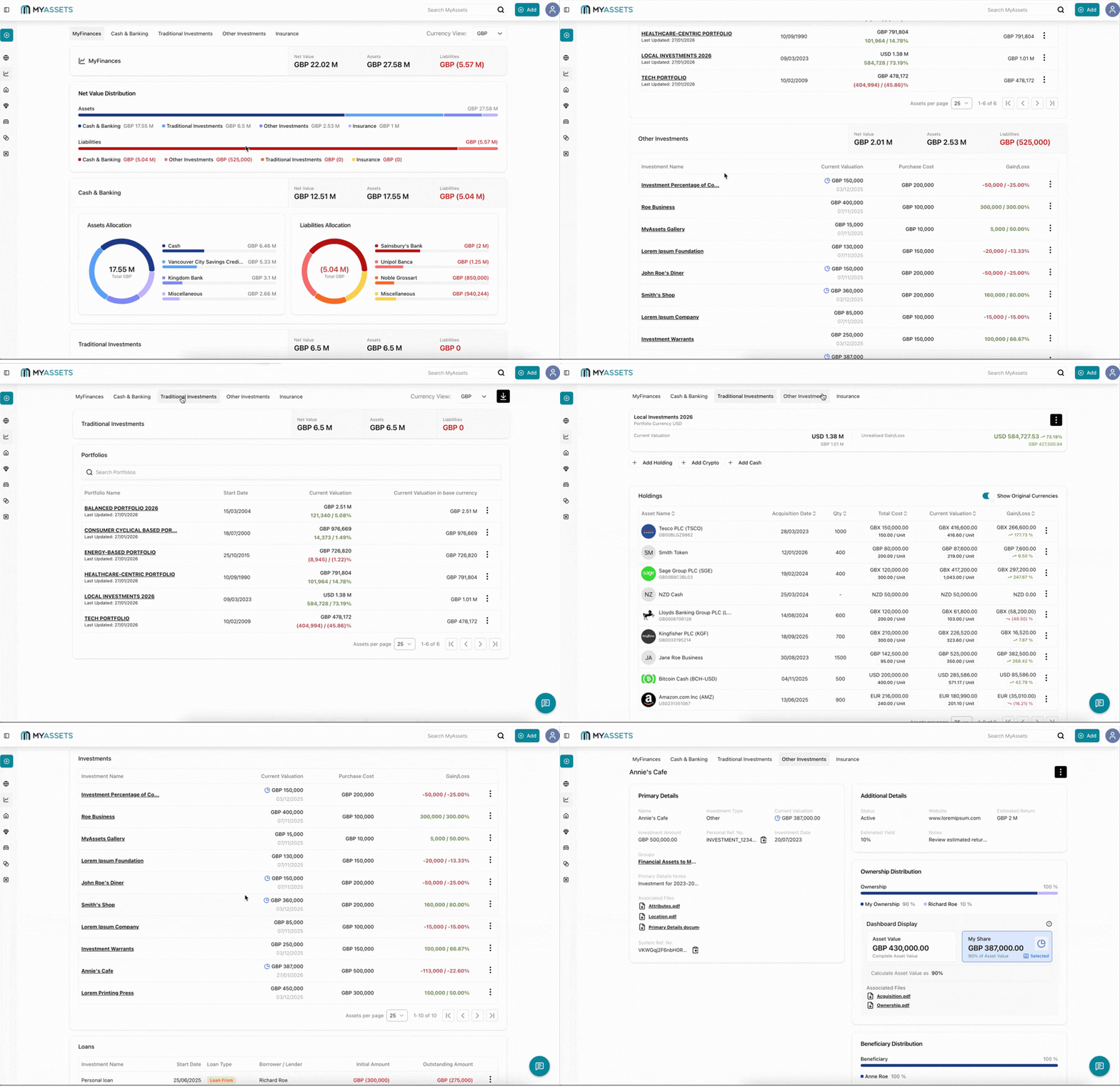
1. Go to MyFinances and Select the Investment Type of Your Portfolio
MyFinances is one of the main categories in MyAssets, and it caters to your financial assets. Its four subcategories include:
- Cash & Banking: Add accounts for your cash, credit cards, loans, mortgages, and bank deposits from financial institutions in different countries.
- Traditional Investments: Manage conventional investments such as public shares, private shares, cash securities, and cryptocurrencies.
- Other Investments: Include private investments such as start-ups, private funds, etc.
- Insurances: Add your life and general insurance policies.
When it comes to adding your investment portfolios in MyAssets, you can choose between Traditional Investments or Other Investments. Each subcategory will have curated fields, allowing you to create and track comprehensive profiles for your investment portfolios.
2. Add Investment Data to MyAssets
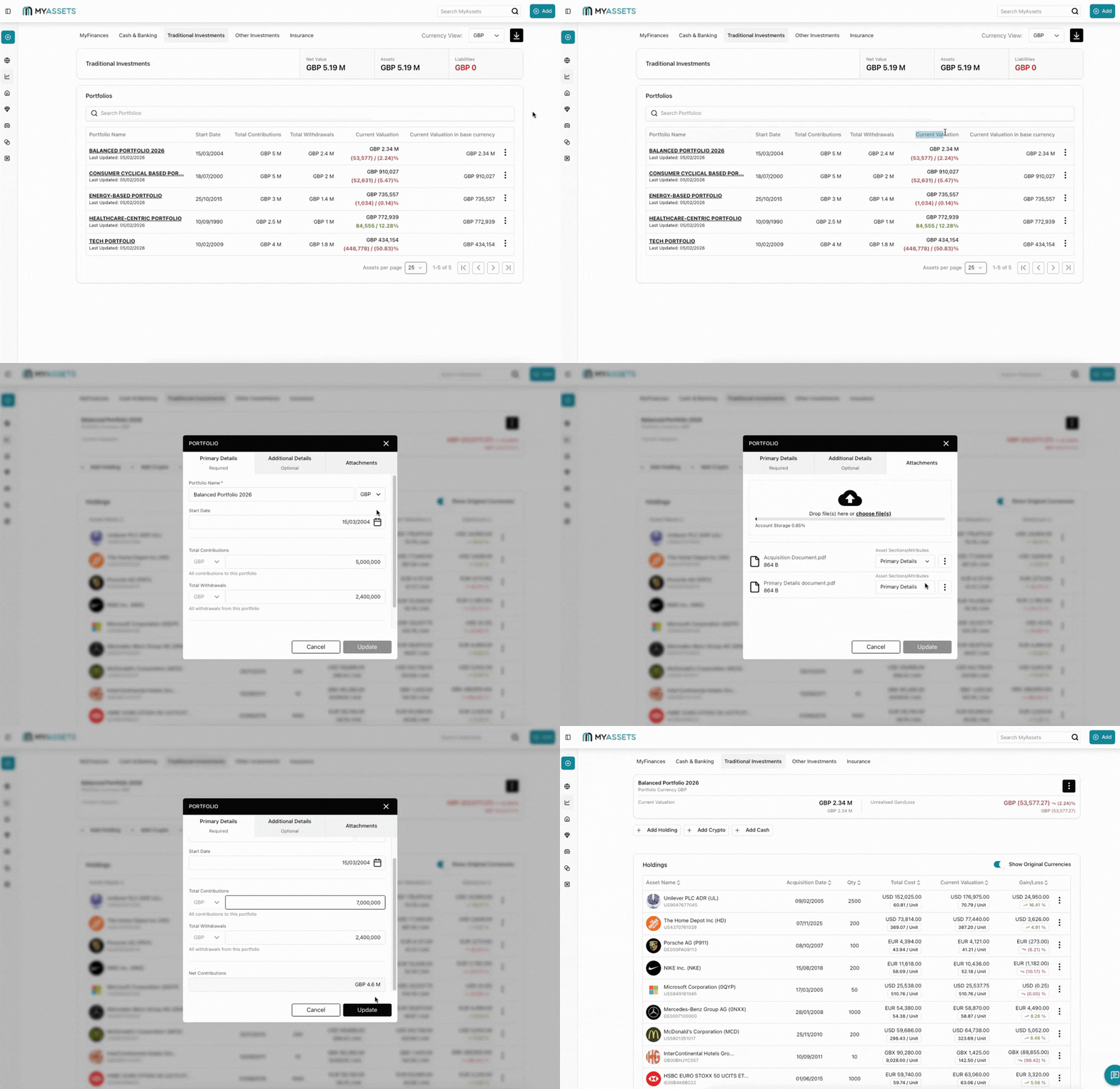
MyAssets provides unique creation modals to streamline your asset data management. This ensures that the generated reports and investment performances accurately reflect your portfolio’s profile.
You can include the following details about Traditional Investments:
- Portfolio Name
- Portfolio Currency
- Start Date
- Total Contributions
- Total Withdrawals
- Groups
- Attachments
MyAssets generates the unrealised gain/loss of the holdings and cryptocurrencies in your portfolios, allowing you to track the valuation of your assets.
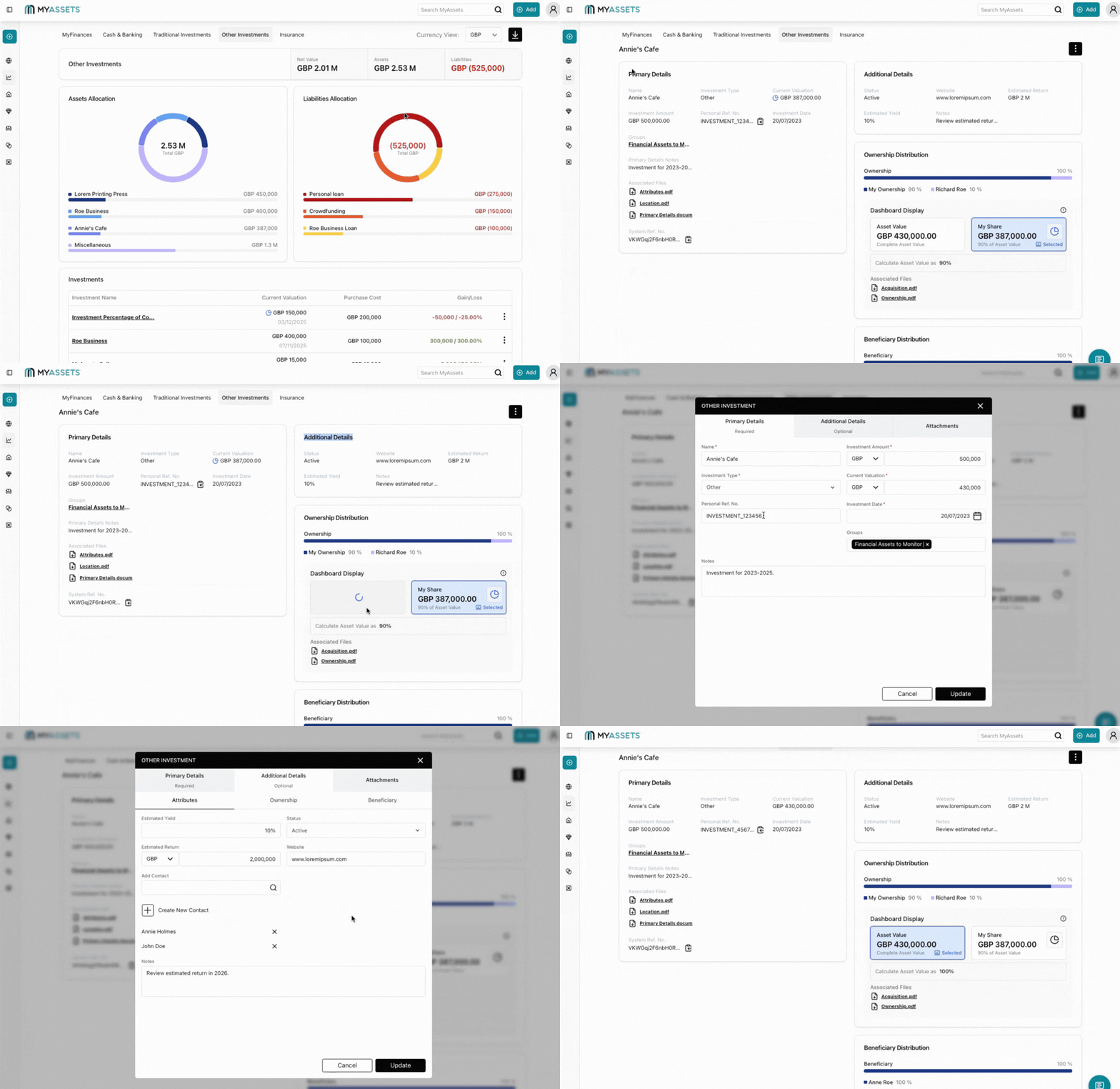
Meanwhile, you can add the following details about Other (or Alternative) Investments:
- Investment Name
- Investment Type (e.g. shares, warrants, options, etc)
- Investment Amount
- Current Valuation
- Investment Date
- Groups
- Attributes
- Ownership
- Beneficiaries
- Attachments
Other Investments provides visual graphs and charts for you to track your asset and liability allocations for different investments.
3. Review, Update, and Track Investment Performance in MyAssets
MyAssets features an export tool that allows you to catalogue and systemise your data in both broad and specific categories. For example, you can export data exclusively in Traditional Investments; however, you can also choose to export data across your entire MyAssets account through the Global Dashboard.
Exporting your data gives you a clear overview of how your assets are performing, ensuring that you accurately monitor your portfolios and overall net worth.
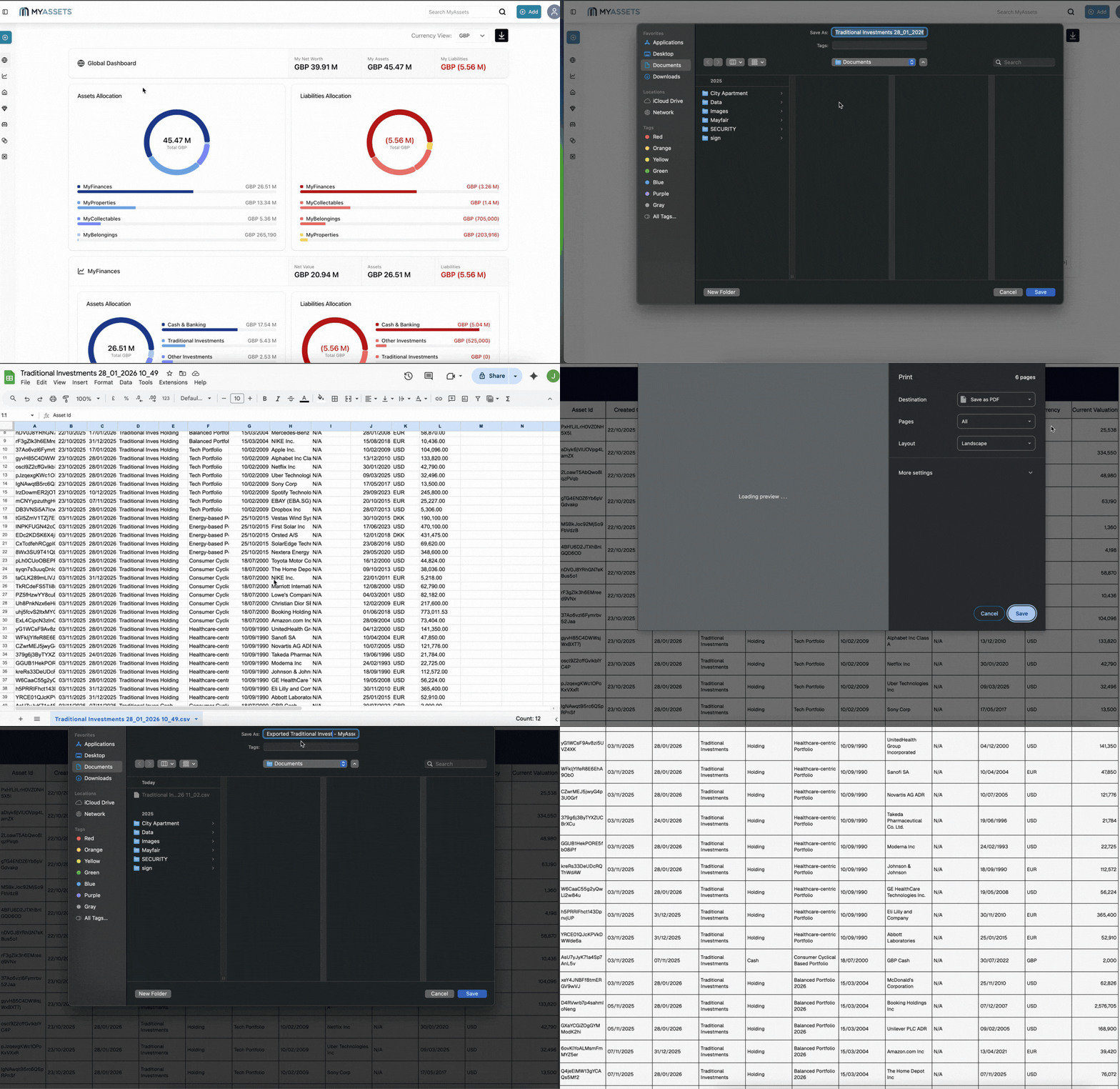
MyAssets also allows you to edit and update granular details about your portfolios and the holdings they contain. For example, you can update the number of units and the current unit price for custom holdings.
This ensures that the digital profiles of your financial assets are consistently up-to-date and relevant.
Tips for Accurate Investment Portfolio Management
Here are ways you can implement seamless portfolio management.
1. Practise regular updates for your investment portfolios
Keeping your asset values and account details up to date helps MyAssets reflect your true financial situation, so you’re not making decisions based on outdated information. This ongoing review also helps you spot changes and trends earlier, which improves long-term planning.
2. Avoid data discrepancies
Centralising all asset information in an asset management app such as MyAssets reduces errors caused by scattered records. When you consolidate data in a reliable hub, you minimise duplication, incorrect entries, and inconsistencies that could distort reporting and performance insights. Regular verification of entries and using consistent naming or categorising systems further reduces the chance of mismatches.
3. Use tags, notes, and reports effectively for your portfolios
Reviewing reports and adding notes to specific investments helps you track context (i.e. purchase conditions or strategy changes), especially for complex holdings. Built-in reporting tools let you generate summaries and detailed views of your investments, which are invaluable for reviewing performance, preparing for tax season, or sharing information with advisors. These features turn raw data into actionable insights and help ensure your investment records stay precise and meaningful.
Why MyAssets Is a Powerful Portfolio Management Tool: Frequently Asked Questions
1. What is investment portfolio monitoring?
Investment portfolio monitoring is the process of tracking your assets, performance, and allocation over time to ensure your investments stay aligned with your financial goals.
2. Does MyAssets provide investment performance reporting software features?
Yes, MyAssets includes built-in investment performance reporting software tools such as performance charts, summaries, and historical tracking.
3. Can I monitor multiple portfolios in one account?
Yes, MyAssets allows you to monitor multiple portfolios in one place, making it ideal for individuals with diversified investments.
4. How often should I update my investment portfolios?
For accurate investment portfolio monitoring, portfolios should be updated regularly or synced automatically when available.
Smart Portfolio Management with MyAssets
Adding your investment portfolios to MyAssets is a powerful step toward taking full control of your financial picture. By bringing all your investments into one secure platform, you eliminate guesswork and gain real-time visibility into your portfolio performance.
MyAssets enables you to organise your assets, monitor growth, and understand how each investment contributes to your overall goals. Whether you manage stocks, mutual funds, ETFs, or alternative investments, the platform’s features ensure accuracy and consistency without unnecessary complexity.
More importantly, MyAssets empowers you to make smarter, data-driven decisions by presenting clear insights and consolidated reporting in one place. As your financial journey evolves, having a centralised system to track and manage your portfolios becomes essential.
With MyAssets, you’re not just adding investments – you’re building clarity, confidence, and a stronger foundation for long-term financial success. Start your 14-day free trial to manage your investment portfolios in MyAssets.



