


As smartphones become ever more essential in everyday life, the traditional physical address book faces obsolescence in its classic form. According to Statista, in 2012, only 9% of mobile phone users aged 55–64 in the United Kingdom used a smartphone. By 2024, that figure had skyrocketed to 93%, a striking transformation in little over a decade. This dramatic increase illustrates not only greater technological accessibility, as average selling prices have declined, but also the growing indispensability of smartphones across all generations.
But does that mean the address book itself is obsolete? Far from it.
Think of the address book not just as a notebook of names and phone numbers, but as the foundational structure for all your contacts, regardless of medium.
While many have moved beyond physical pages, having a digital address book remains vital. Digital platforms now auto‑sync contact info, integrate with calendars and email, and support smart search and tagging. Whether for ecommerce deliveries, secure business communications, or gifting, a well‑maintained digital address book keeps information accurate, accessible, and always at your fingertips.
MyAssets demonstrates how an asset management system can integrate your address book and assets. Instead of merely storing names and numbers, this kind of system allows you to tag and group assets, like financial accounts, properties, and belongings, with associated contacts. This provides an integrated overview of who owns what, how to reach them, and when updates are due.
By connecting asset-tracking with address book management, you can build a robust, intelligent address book that goes beyond mere contact info—it becomes a dynamic platform for managing both people and things in one cohesive digital environment.
In short, the question isn’t whether address books remain important—it’s how to redefine and leverage them for modern needs. The staggering surge in smartphone adoption underscores the potential reach and utility of digital contacts. Asset‑centric solutions like MyAssets show users how to embed contacts within a broader ecosystem of tracked assets, providing context-sensitive insights.
The address book isn't a fading relic in today's digital age. It’s an evolving, essential tool. This article shows you how to integrate contacts and assets with MyAssets, one of the best apps to track your assets and address book on a secure digital platform.
- Why It’s Important to Integrate Your Address Book and Assets
- An Integrated Address Book and Assets Management App Reduces Administrative Burden
- A Smart Address Book and Assets App Streamlines Estate Planning
- Address Book Integration Simplifies Asset Organisation
- Key Features to Look for in a Smart Address Book and Asset Management App
- Your Smart Address Book Must Have Contact and Beneficiary Linking
- Your Integrated Address Book and Asset App Should Have Secure Data Management
- Your Smart Address Book and Asset App Must Include Customisable Modals for Real-time Updates
- How MyAssets Simplifies Address Book and Asset Integration
- Step-by-Step Guide to Integrate Contacts and Assets in MyAssets
- Keep Your Digital Records Updated and Secure
- Smart Address Book and Assets Integration: Frequently Asked Questions
- MyAssets: Manage Contacts and Assets in One App
Why It’s Important to Integrate Your Address Book and Assets
We’ve shortlisted three integral reasons you should use a digital app that can intuitively integrate your contacts and assets.
1. An Integrated Address Book and Assets Management App Reduces Administrative Burden
Administrative work typically refers to routine, ongoing tasks involved in the smooth functioning of an organisation, such as scheduling, record-keeping, billing, and reporting – yet this also applies to everyday life.
Business administrative workload can be repetitive, time-consuming tasks that divert energy from core activities, such as managing documentation, approvals, spreadsheets, and communications.
And it can be argued that individuals encounter similar demands in personal life: paying bills, renewing policies, booking appointments, logging expenses, and tracking warranties – duty-bound tasks that often consume mental bandwidth.
This type of personal admin work is defined as “life admin”, which encompasses the planning, organising, and paperwork required to manage routine and unforeseen life events.
This can include budgeting, managing documents, scheduling maintenance, and setting reminders – essentially the personal equivalent of business admin. Auditing your life admin can significantly reduce stress and increase efficiency.
Integrating an address book and asset management in an app such as MyAssets can make life admin effortless. Users can centrally track contacts, associated documents, assets, and reminders in a central platform. An integrated system reduces manual effort while offering a comprehensive, real-time overview of personal inventories and obligations. Linking contacts and assets gives you clarity and control, transforming administrative burdens into streamlined systems.
2. A Smart Address Book and Assets App Streamlines Estate Planning
Estate planning typically involves taking inventory of your assets, drafting a will, establishing trusts, appointing executors and guardians, granting powers of attorney for health and finance, and navigating probate and tax planning. This preparation ensures clarity and control, whether you own modest savings or complex investments.
Integrating an address book into your asset management app makes this process smoother. You gain instant access to key contacts (e.g. executors, trustees, attorneys) alongside relevant documents and reminders, keeping your estate plan organised and actionable.
Furthermore, family offices provide specialised services to protect, grow, and coordinate wealth, including estate and succession planning.
When it comes to executing your plan, effective asset transfers are crucial: Tools like wills, trusts, joint ownership, gifting, and professional legal guidance to ensure assets pass smoothly to heirs, reducing tax burdens and minimising probate delays.
An integrated system stores contacts and links them to assets across different silos, ensuring your estate plan is comprehensive, connected, and confidently managed.
3. Address Book Integration Simplifies Asset Organisation
Managing your address book is more than just keeping names and numbers – it’s about organising and enriching connections for personal or asset-oriented use. Ask Data Entry highlights this with a clear insight: As your contact list grows, manually searching becomes inefficient, and outdated or duplicate entries can cause miscommunication.
A good address book management includes regular updates, deduplication, complete contact fields, tagging, syncing across platforms, reminding features, and central storage – all making contact retrieval effortless.
MyAssets takes this a step further by integrating your digital address book directly into an asset management app. The platform lets you consolidate contacts – sellers, beneficiaries, service providers – and link each to specific assets like financial accounts, properties, collectables, or belongings. This means every time you scan a receipt, upload a warranty, or share a supplier contact, the system associates it automatically.
This results in a unified dashboard showing assets, relevant contacts, and documents – all in one secure place. With integrated contact and asset management, you eliminate manual cross-referencing and gain a comprehensive, real-time snapshot of your possessions and the people tied to them, simplifying life and boosting efficiency.
By unlocking proper address book management and integrating it in a central asset management app, you ensure your contacts are part of a powerful personal organisation ecosystem.
Also Read: Best Apps for Organising Your Life and Boosting Productivity
Key Features to Look for in a Smart Address Book and Asset Management App
1. Your Smart Address Book Must Have Contact and Beneficiary Linking
One of the most common types of address book contacts concerning your assets is beneficiaries. Designating beneficiaries is one of asset management's most crucial yet often overlooked steps. Beneficiaries are fundamental for protecting your legacy, as they automatically receive specific assets, such as life insurance, retirement funds, or bank accounts, after your death.
Organising your beneficiaries with an asset management app allows you to keep clear records that you can easily access on a secure platform. Having the ability to link your beneficiaries to assets on your chosen app enables you to track your named beneficiaries.
2. Your Integrated Address Book and Asset App Should Have Secure Data Management
Recent findings from the UK’s Information Commissioner’s Office (ICO) reveal a concerning statistic: 55% of adults in the United Kingdom have had data lost or stolen, impacting nearly 30 million people. This highlights not only the sheer scale of the issue, but also the emotional toll—30% report emotional distress, and 25% received no support from the impacted organisation.
Finding a secure platform that properly encrypts and protects data is essential to safeguarding personal information, including address book contacts. Without robust security, sensitive details risk exposure in breaches like those affecting over half of UK adults.
One effective way to discover such high-security platforms is through beta testing, which allows users to evaluate asset management apps under real-world conditions before full release. Through feedback on user experience, encryption implementation, and data handling protocols, beta testing helps identify apps that genuinely prioritise data protection.
Selecting an asset management tool that leverages strong encryption and security is paramount. Engaging with well-run beta programs provides insight into a platform’s ability to safeguard your data and address book contacts effectively.
3. Your Smart Address Book and Asset App Must Include Customisable Modals for Real-time Updates
It can be challenging to organise valuables and belongings as they accumulate over time. Managing your physical assets at home begins with creating a comprehensive inventory. This can include cataloguing each item’s type, location, condition, value, and ownership. Categorising assets by rooms, purposes, or value tiers turns scattered belongings into a structured, searchable system.
To maintain accuracy, your chosen asset management app must offer editing capabilities for both physical assets and your address book contacts. This ensures you can update information like item relocation, condition changes, or new contacts associated with specific assets.
For example, someone moving a piece of furniture or assigning a contact as the asset’s custodian should be able to make edits easily. These features keep your records current, reduce misplacement, and improve long-term tracking reliability.
By combining best practices for inventory, categorisation, and documentation with a digital app that allows flexible editing, you translate a manual home asset system into a dynamic, living record.
MyAssets supports this level of organisation on the platform, allowing users to tag assets, upload important documents or receipts, and assign contacts and locations – all in one centralised place. This empowers you to manage valuables efficiently, ensure your address book contacts linked to assets are up-to-date, and maintain a reliable foundation for insurance or estate planning.
How MyAssets Simplifies Address Book and Asset Integration
When choosing an asset management app, it’s important to interlink and connect different data types seamlessly. This ensures that updates in one area, like asset location or valuation, sync across your entire system. The ability to integrate with third-party services via secure APIs further enhances reliability and reduces manual errors.
MyAssets shows how using one unified platform helps users organise their lives comprehensively. You can track valuables, personal belongings, financial assets, and more, all in one place accessible via web or mobile. This centralised approach simplifies asset management and enhances visibility and control over your possessions.
MyAssets also supports linking specific assets to relevant contacts in your address book. Whether you're managing an heirloom entrusted to a family member or a business tool assigned to a colleague, the Smart Asset Linking ensures every asset is connected to its associated person. If details change—in case you reassign an asset or update contact information—the integration ensures all linked records reflect that update instantly. This keeps your records accurate, reduces oversight, and ensures accountability.
Read More: How To Use The Comprehensive Asset Categories In MyAssets
Step-by-Step Guide to Integrate Contacts and Assets in MyAssets
We’ve shortlisted the steps to adding contacts to MyAssets and how to interlink them to your assets.
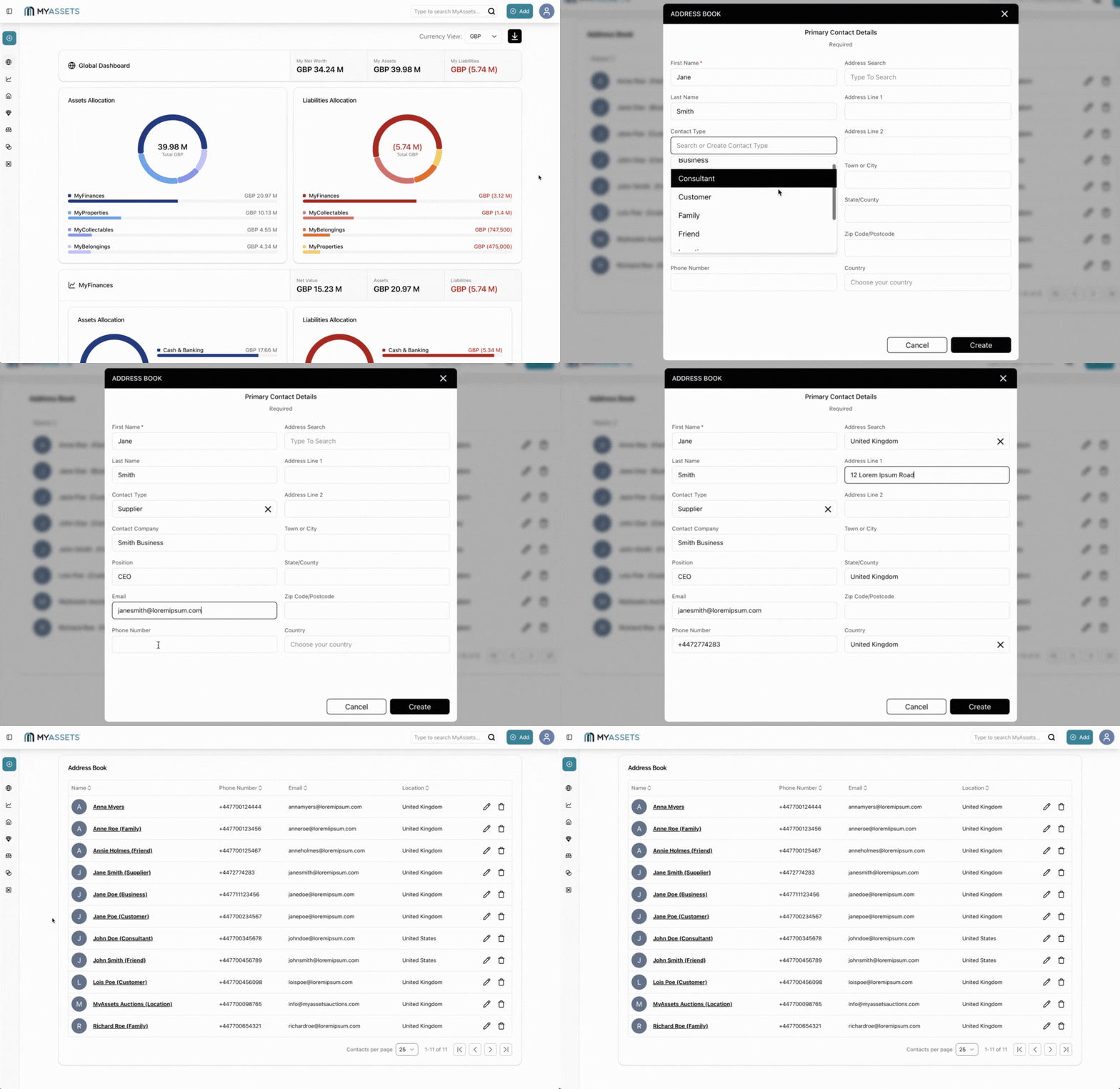
1. Add a Contact in the Address Book
The Address Book in MyAssets allows you to add contacts and interlink them with your assets. You can include important details about your contacts, such as:
- Full name
- Contact Type (e.g. family, business, supplier, etc.)
- Address
- Email Address
- Phone number
The Address Book makes contact information easily accessible for you in your account, allowing you to reach people when you need them. MyAssets’ expansive range enables you to add contacts from essentially any area of your life – be it beneficiaries, stakeholders, or even property management and art industry contacts.
2. Add Assets in MyAssets
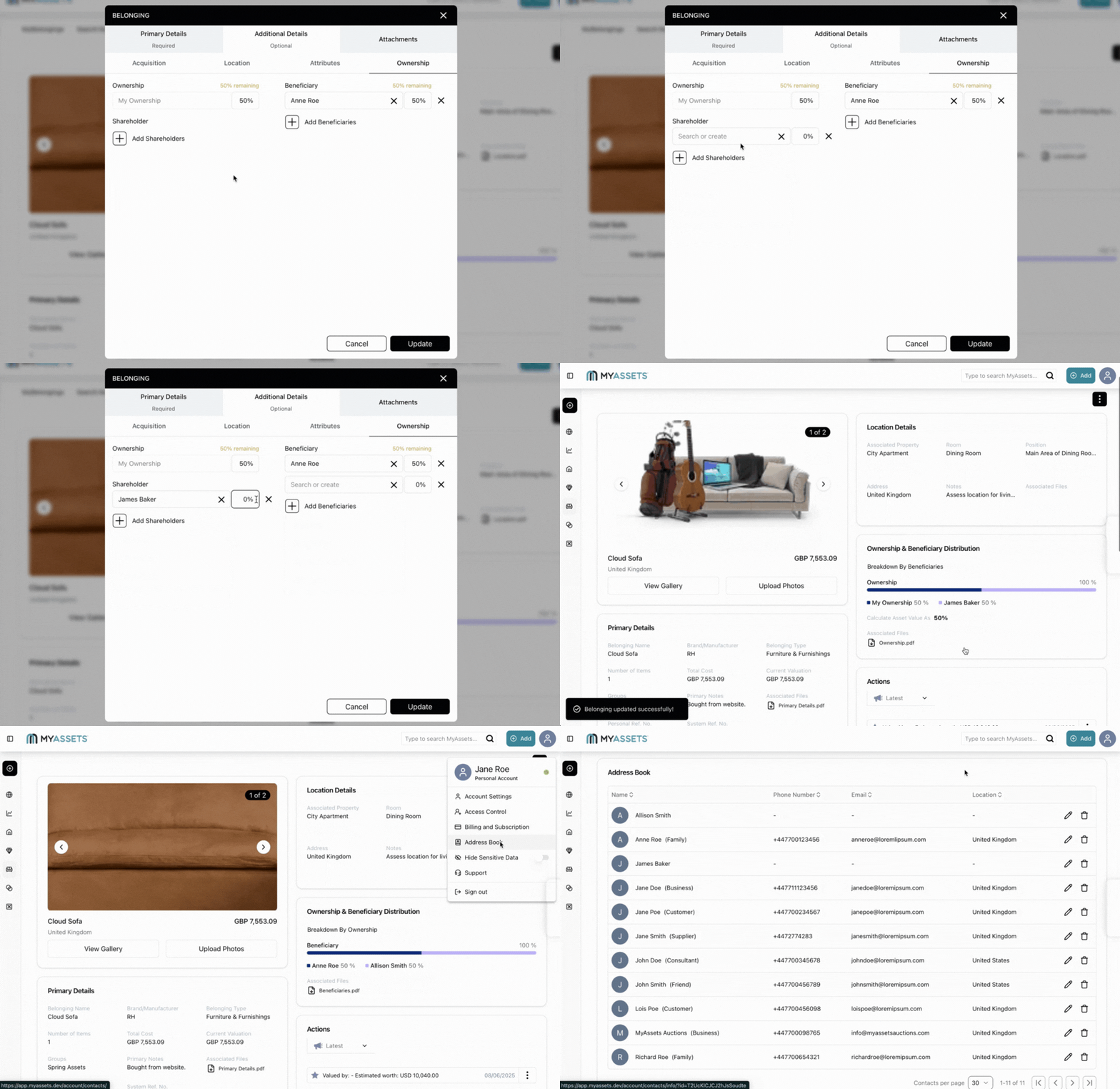
Populate the relevant MyAssets silos (e.g. MyFinances, MyProperties, MyCollectables, MyBelongings) with your assets and valuables.
Because of the platform’s extensive range, you can add any item that has value and worth to you. For example, your bank accounts and life insurance policies slot perfectly under MyFinances. But even sentimental items, like family heirlooms and legacy pieces that have been passed down to each generation, can be included under MyCollectables or MyBelongings.
If your assets have already been uploaded onto the platform, select the relevant asset you wish to update with the contact details.
3. Link your Contacts to your Assets
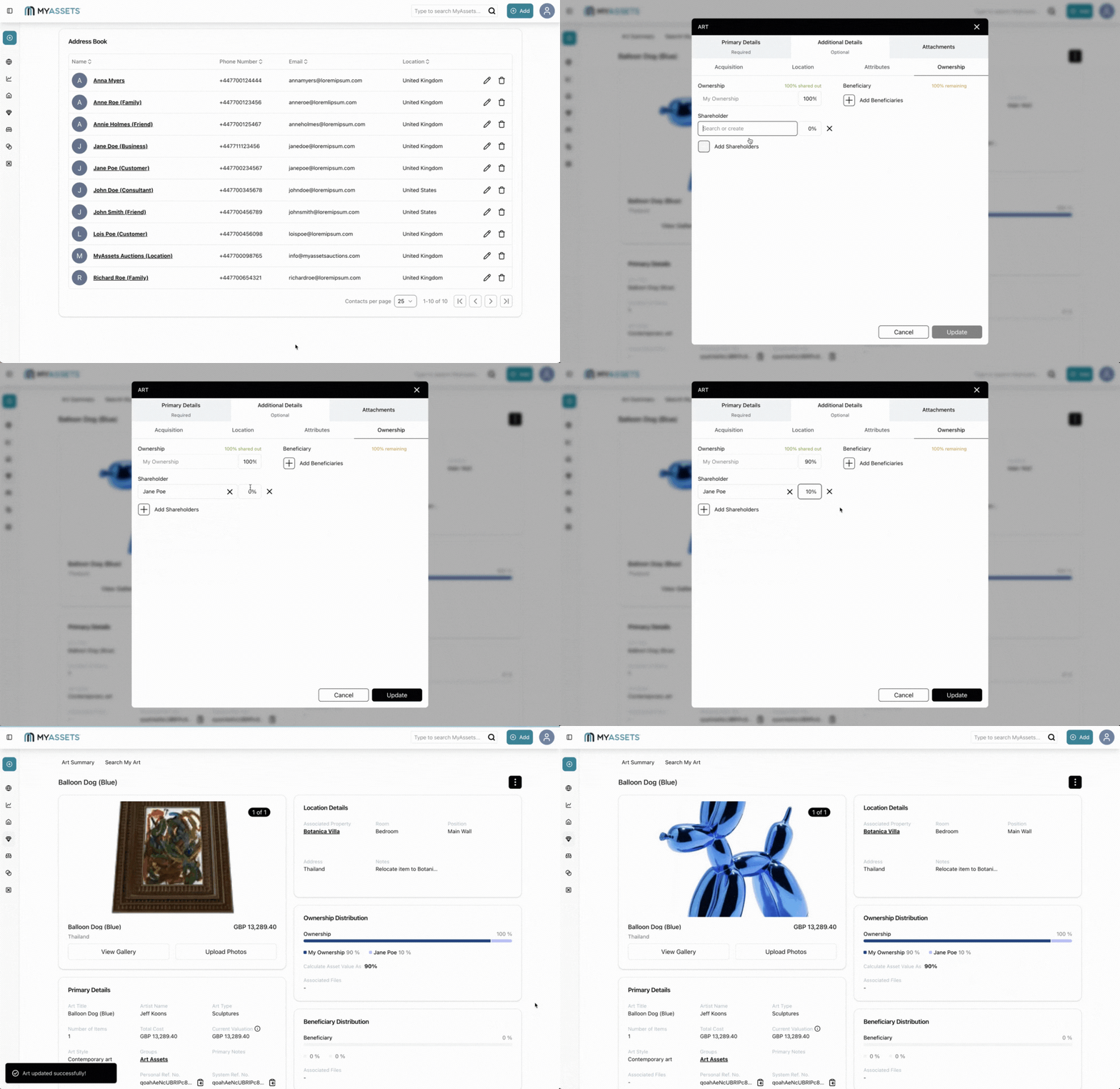
There are different types of Contacts you can include for assets in each silo:
- MyFinances: Beneficiary, Shareholder, Insurance Policy Holder, Insurance Broker, Insurance Specialist
- MyProperties: Seller, Tenant, Property Manager, Introducing Agent
- MyCollectables: Contact’s Address as Location of Asset, Seller, Beneficiary, Shareholder
- MyBelongings: Contact’s Address as Location of Asset, Seller, Beneficiary, Shareholder
You can choose to add an existing Contact in the necessary field or even create a new Contact whilst you’re filling in the details for that specific asset. Details will automatically be updated if you decide to edit information for the linked Contact or asset.
Keep Your Digital Records Updated and Secure
Integrating your address book and assets in a single platform offers significant efficiency and reliability gains:
- Centralised data management: Housing contacts and assets together streamlines record retrieval. You can view the full context of any asset – who owns it, who manages it – without switching tools. This unified approach enhances oversight and control.
- Faster disaster recovery: If data loss occurs, due to hardware failure or natural disaster, a centralised digital backup ensures everything (contacts, inventories, files) can be restored swiftly from one source, reducing downtime and effort.
- Improved data accuracy: When contacts or asset details change (e.g. asset relocation or a contact’s info update), the integrated platform ensures updates propagate across linked records in real-time, minimising discrepancies and manual errors.
- Scalability: As your list of valuables and contacts grows, having a scalable system means you can continue adding and organising without fragmenting your data.
- Streamlined record keeping: Instead of managing spreadsheets or multiple apps, a single system consolidates all entries. This reduces administrative overhead and helps maintain consistent record‑keeping practices.
Platforms like MyAssets also double as a secure file storage system, which allows users to upload important documents and images related to their contacts and assets. This not only strengthens the linkage between assets and people but also enhances organisation, security, and retrievability.
Smart Address Book and Assets Integration: Frequently Asked Questions
1. Why should I integrate my contacts with my assets?
Integrating your contacts with your assets in one platform creates a clear link between people and the items they own or manage, making responsibility and tracking effortless. It also ensures updates and security settings stay consistent across your entire system, reducing errors and improving control.
2. What types of assets can I track with an asset management app?
This will depend on the asset management app or tool you use. With MyAssets, you can track most (if not all) types of assets in the platform – from financial accounts and properties to rare collectables and home belongings. This gives you a complete digital overview of everything you own and value.
3. Can I update my contact and asset information anytime?
Your selected asset management app should have editing capabilities to ensure your records are up-to-date. MyAssets provides intuitive Creation modals that allow you to update details about your assets, contacts, and documents uploaded on the platform.
MyAssets: Manage Contacts and Assets in One App
Using MyAssets to integrate contacts and assets in one platform offers a streamlined, efficient approach to managing personal information. By linking assets directly to address book contacts, you gain centralised control, real-time updates, and improved accuracy across records.
MyAssets also allows for secure file uploads, ensuring all critical data is stored together. This integration simplifies tracking and accountability and supports faster disaster recovery and a scalable organisation as your list of belongings and relationships grows. MyAssets turns complex asset and contact management into one cohesive, reliable system.
Integrate your address book into your asset management system. Add your contacts and assets in MyAssets with our 14-day free trial.
![Address Book Hero [800x600].svg](https://confident-nature-8860568b09.media.strapiapp.com/Address_Book_Hero_800x600_b06f1ed4e7.svg)



