


Did you know that net worth is a stronger determinant of financial satisfaction than income? While a high salary provides a flow of capital, research shows that the stock of accumulated wealth is what truly drives peace of mind. This is confirmed by the study by Roszkowski and Grable, which found that the correlation between net worth and happiness (.52) significantly outperformed that between income and happiness (.41).
This suggests that wealth, whether held in real estate, investments, or other assets, acts as a buffer against financial ill-being. How so? While income allows for consumption, net worth provides the solvency needed to weather emergencies or unpaid bills without distress.
Ultimately, this insight leads to a practical challenge: financial clarity depends on visibility. Without a clear view of either income or wealth, it becomes difficult to understand one’s true financial position. This is where a wealth tracker, like a net worth spreadsheet, becomes essential.
A net worth sheet provides a starting point by bringing together not just income but a complete picture of what is owned (real estate, investments, and physical assets) and what is owed (including mortgages and loans). This approach turns scattered information into a clear, measurable overview that helps guide better financial decisions.
While a net worth calculator spreadsheet is effective for organising, calculating, and analysing financial data, building one from scratch can feel complex. Fortunately, this article on how to make a net worth spreadsheet breaks it down step by step, from consolidating financial data to applying formulas to compute net worth accurately.
- What is a Net Worth Spreadsheet?
- Pros and Cons of Using a Net Worth Tracking Sheet
- What to Prepare Before Creating a Net Worth Sheet
- How to Make a Net Worth Spreadsheet to Track Wealth
- Establish the Timeframe
- Organise Asset and Liability Categories
- List All Assets
- Record All Liabilities
- Assign Accurate Values
- Set Formula
- Add Charts and Graphs
- Tips for Creating a Free Net Worth Spreadsheet
- Building a Simple Net Worth Spreadsheet From Scratch
- Free Net Worth Spreadsheet: Frequently Asked Questions
What is a Net Worth Spreadsheet?
A net worth spreadsheet is a tool built in Excel or Google Sheets to monitor wealth. It works by requiring users to list relevant financial data, including:
- Assets: Valuable resources capable of being converted to cash.
- Cash, checking accounts, bonds, stocks, etc.
- Liabilities: Financial obligations that remain incomplete or unpaid.
- Auto loans, credit card debt, mortgage, personal loans, etc.
The net worth worksheet then aggregates all this information and applies formulas to calculate the difference between assets and liabilities. This transforms a simple document into a personalised financial ledger, allowing for:
- Data input and formatting. Enter text, numbers, dates, and formulas into structured cells, with formatting options, such as currency, percentages, and date styles.
- Formulas and built-in functions. Perform calculations using formulas and predefined functions like SUM, AVERAGE, and VLOOKUP to automate repetitive tasks.
- Data analysis and visualisation. Sort and filter data, create charts and pivot tables, and apply conditional formatting to identify trends and highlight key insights.
Learn More: Net Worth Aggregators Explained: Simplify Money Tracking
Pros and Cons of Using a Net Worth Tracking Sheet
Considering a net worth tracking sheet? Here’s a look at the pros and cons to understand the benefits and trade-offs.
Pros
- Full Customisation: Let users personalise every aspect, from categories and formulas to spreadsheet layout, to match their individual financial needs.
- Low to no cost: Net worth Excel and net worth tracker Google Sheets are freely accessible, and most premium net worth spreadsheet templates charge just a one-time fee, keeping net worth tracking budget-friendly.
- Financial Mindfulness: Manually updating account balances each month helps build a hands-on connection with one’s finances, encouraging mindful spending and greater financial awareness.
Cons
- Error-Prone: A simple miscalculation, deleted formula, or misplaced decimal can lead to inaccurate net worth figures and a misleading view of financial standing.
- Manual Data Entry: Requires manually logging into each bank, brokerage, and loan account to update balances, which can become tedious as the financial portfolio expands.
- Requires Technical Know-How: Leveraging features such as dynamic charts and detailed trend analysis demands familiarity with Excel functions and proper data structuring.
See Also: Net Worth vs Credit Score: What Tells the Real Story?
What to Prepare Before Creating a Net Worth Sheet
Before opening a blank spreadsheet, the foundation must be established. To ensure the wealth tracking spreadsheet is accurate from day one, below is a checklist to guide the preparation process.
Financial Account Information
Gather statements and balances from all financial accounts, including:
- Cash on Hand: Physical cash kept in wallets or at home.
- Checking and Savings Account: Latest balances from banking apps or statements.
- Digital Assets: Current market values for cryptocurrency wallets or NFT platforms.
- Investments: The market value of stocks, bonds, ETFs, and mutual funds.
- Retirement Accounts: Balances for workplace pensions, personal pensions, Lifetime ISA, and state pension.
- Other Cash Equivalents: Certificates of Deposit (CDs), money market funds, and life insurance policies with a cash component.
Property and Other Physical Asset Value
Compile all documents for physical assets and assign their current asset values:
- Personal Property: Valuable items such as jewellery, artwork, and other collectable investments, priced based on what they sell for in today’s market.
- Real Estate: Current market value of primary residence or investment properties (check Rightmove, Zoopla, or local property assessments).
- Vehicles: Cars, boats, or RVs, valued according to current resale prices (Parkes if helpful for car valuation).
Debt Checklist
For an accurate net worth calculation, all outstanding liabilities should be accounted for, as these represent the claims against the assets listed above.
- Secured Debt: Remaining balances on mortgages, home equity lines of credit (HELOC), and auto loans.
- Unsecured Debt: Total balances for all credit cards, personal loans, and private or federal student loans.
- Tax Liabilities: Any estimated taxes owed or outstanding balances with revenue services.
Date and Tools
Set up the environment where the data will be stored:
- The Platform: Select which spreadsheet to use, Excel or Google Sheets.
- The Tracking Date: Decide when to record financial data (i.e. month-end, quarter-end, or year-end) to stay consistent.
How to Make a Net Worth Spreadsheet to Track Wealth
Are you thinking about building your own free net worth spreadsheet template, but don’t know where to start? Here is a step-by-step process for building a simple net worth spreadsheet in Google Sheets or Excel.
Step 1: Establish the Timeframe
The first step is to decide how often net worth will be recorded. Monthly? Quarterly? Or annually?
Once established, the horizontal axis in the spreadsheet can be organised to reflect each period. For example, if net worth is updated monthly, the header row can be labelled with each month –January, February, March, and so on. Column A should be left blank, as it will serve as the space to list all assets and liabilities.
In this layout, individuals can see the progression of assets and liabilities over time.
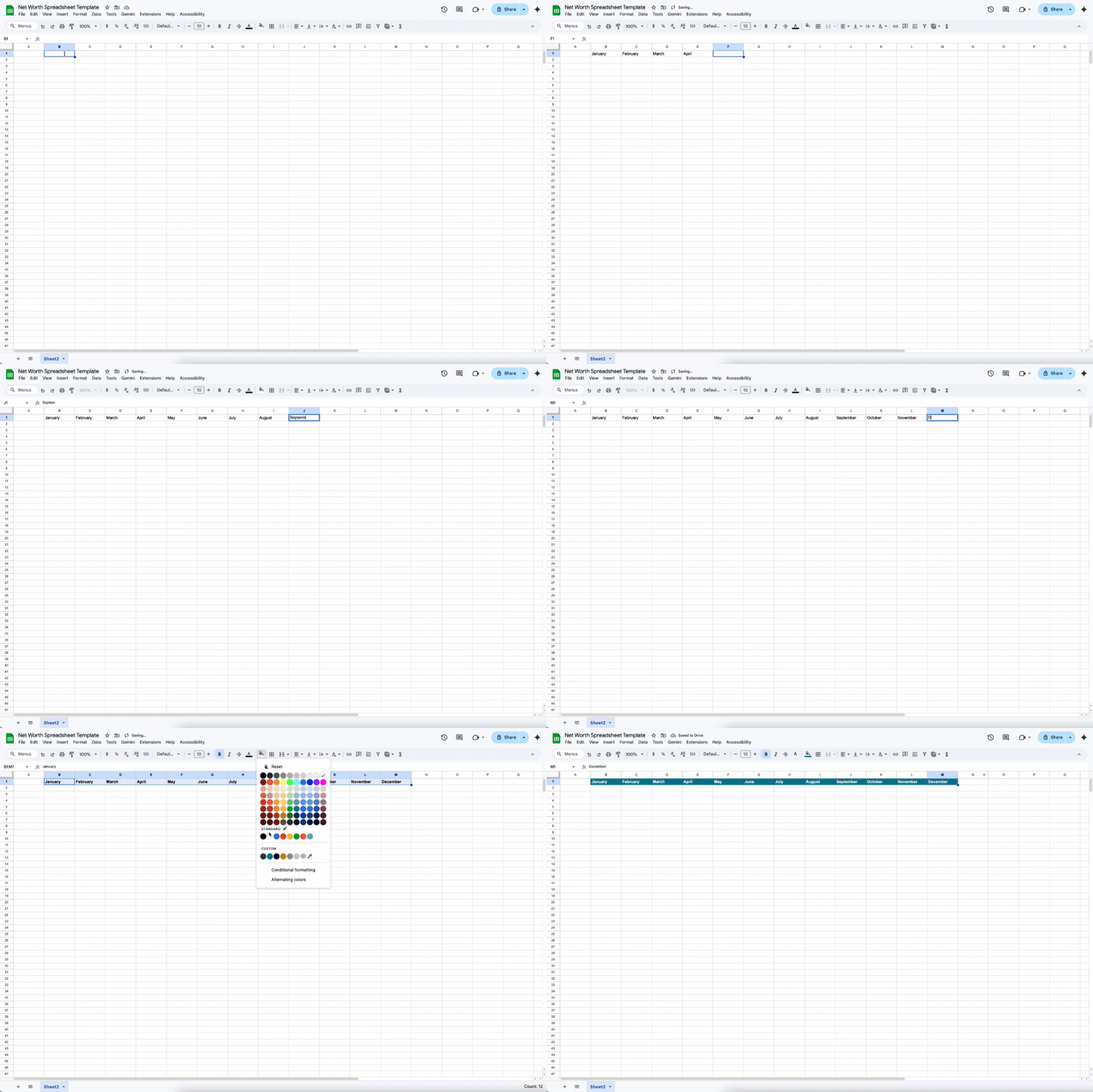
Note: The tool used in this guide is Google Sheets
Step 2: Organise Asset and Liability Categories
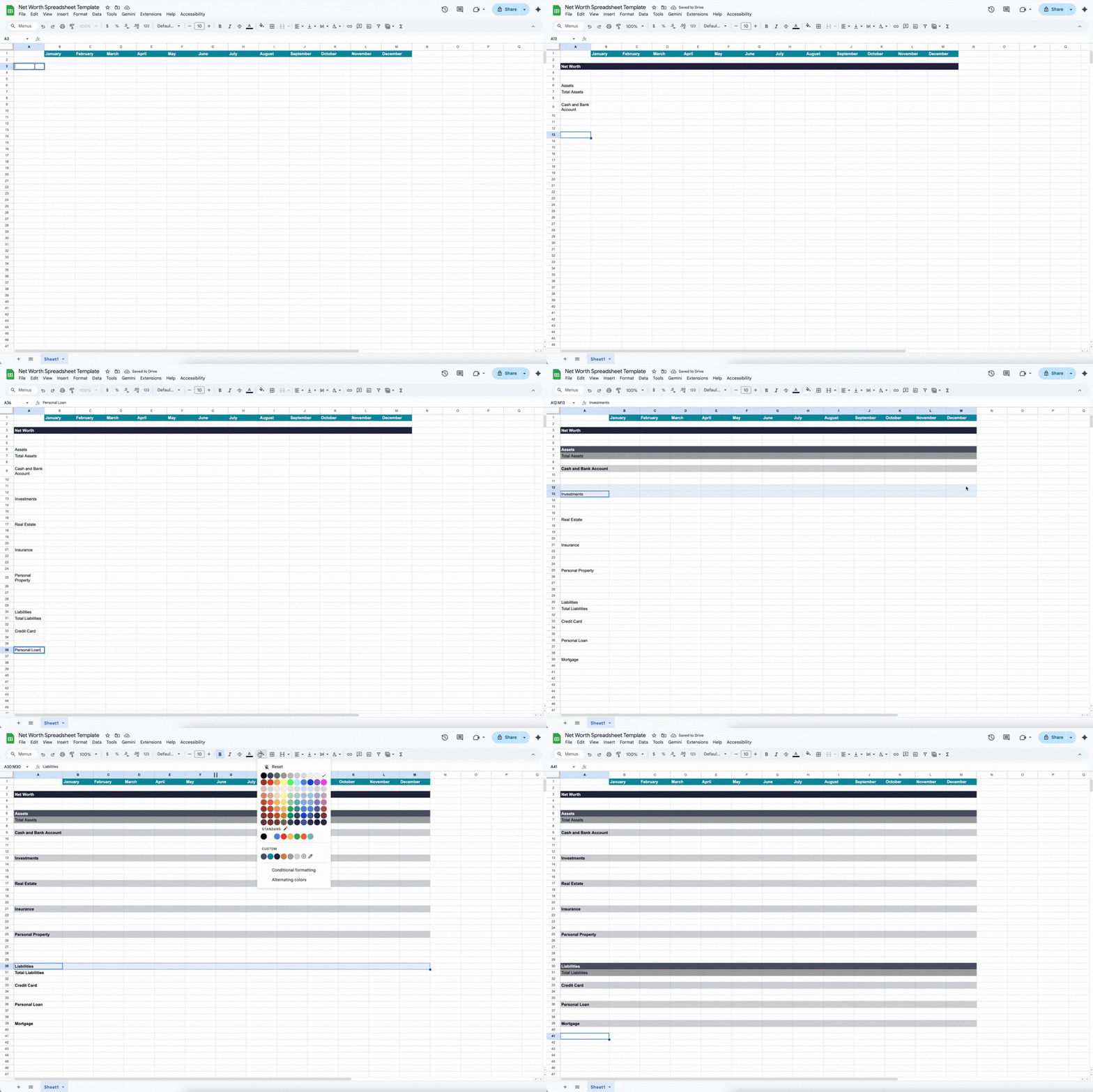
To ensure the most important data is immediately visible, the first few rows beneath the timeframe headers should be reserved for net worth summary figures. Placing net worth for each period at the top eliminates the need to scroll through the entire sheet.
The subsequent rows are then divided into two blocks:
- Asset rows: Grouped by type, such as cash, investment accounts, and real estate.
- Liability rows: Grouped by debt type, including credit cards, personal loans, and mortgages.
This top-down arrangement pushes detailed entries lower in the sheet, allowing the full financial overview to appear first when the file is opened.
Step 3: List All Assets
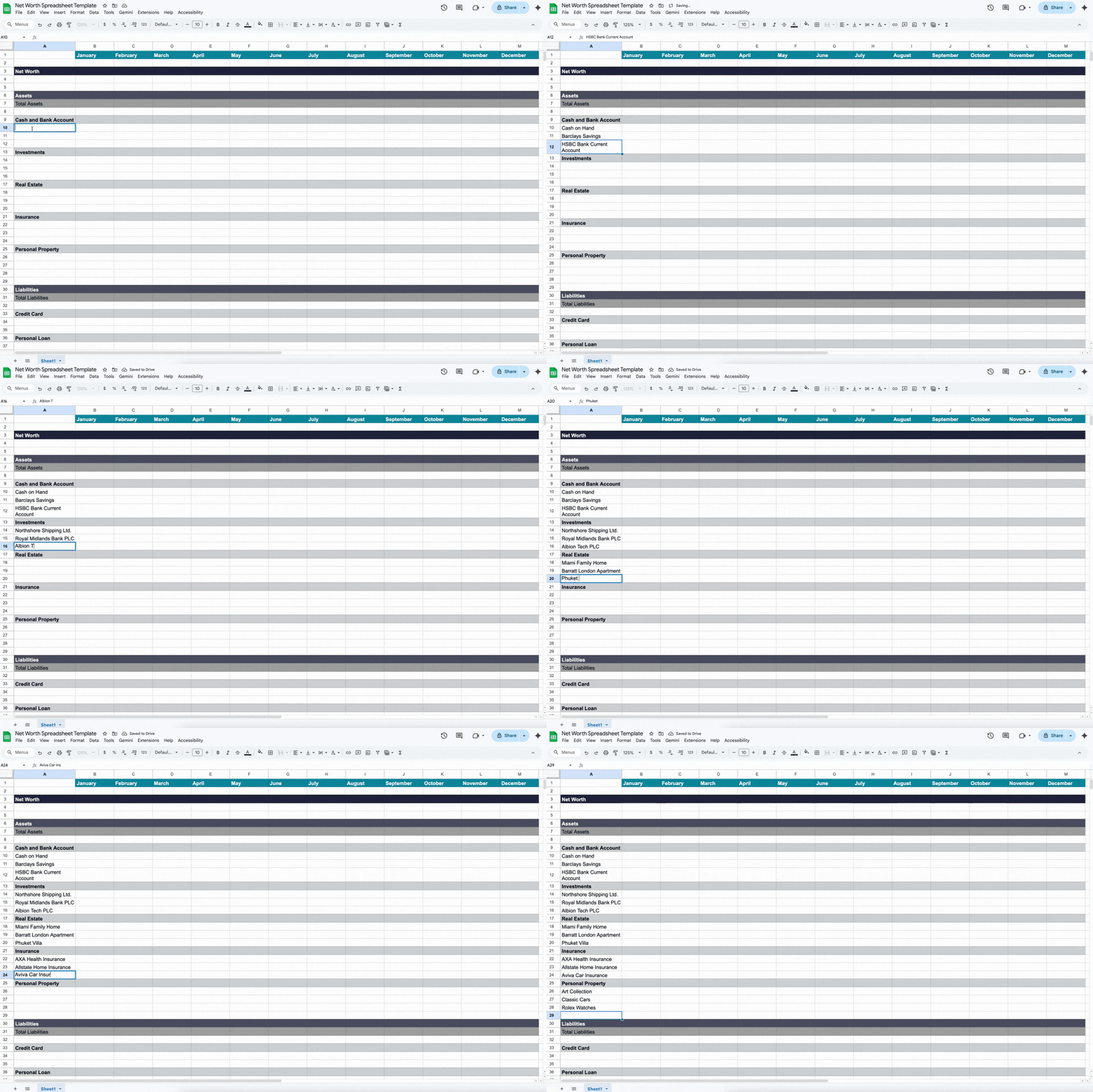
With the categories placed, the next phase involves populating the asset section with specific, granular line items. In this step, every account or item of value is listed as a separate row under its respective category.
To find out which assets to include, consider the following:
- Cash and Bank Accounts
- Checking Accounts
- Physical Cash
- Savings Accounts
- Investments
- Bonds
- Cryptocurrency
- Stocks
- Mutual Funds
- Real Estate
- Land
- Primary Residence
- Rental Properties
- Personal Property
- Art Collection
- Vehicles (cars, boats, motorcycles)
- Watches
Listing assets separately rather than as one total lets users track the progress of each account over time. This detailed view highlights which assets are growing and which may need strategic attention.
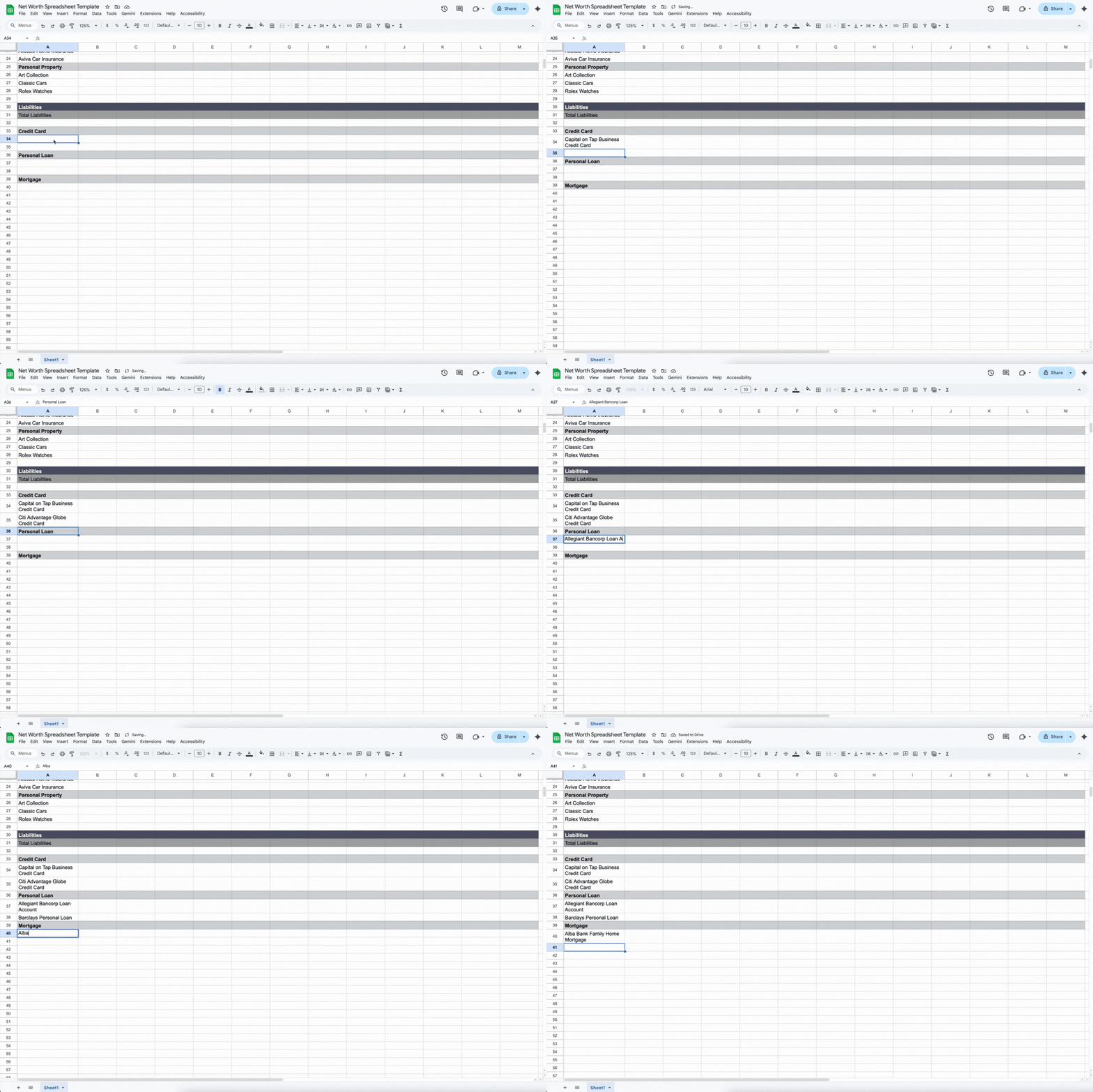
Step 4: Record All Liabilities
Following the asset list, the next phase is to document every liability. In a net worth sheet, liabilities are those incomplete or unpaid financial obligations, which include:
- Auto Loans
- Credit Card Debt
- Mortgage
- Personal Loans
- Student Loans
- Taxes Owed
Each liability should be listed as a separate row within the liabilities section. This allows individuals to track each debt and its impact on overall net worth.
Read More: 10 Money Habits That Are Hurting Your Finances
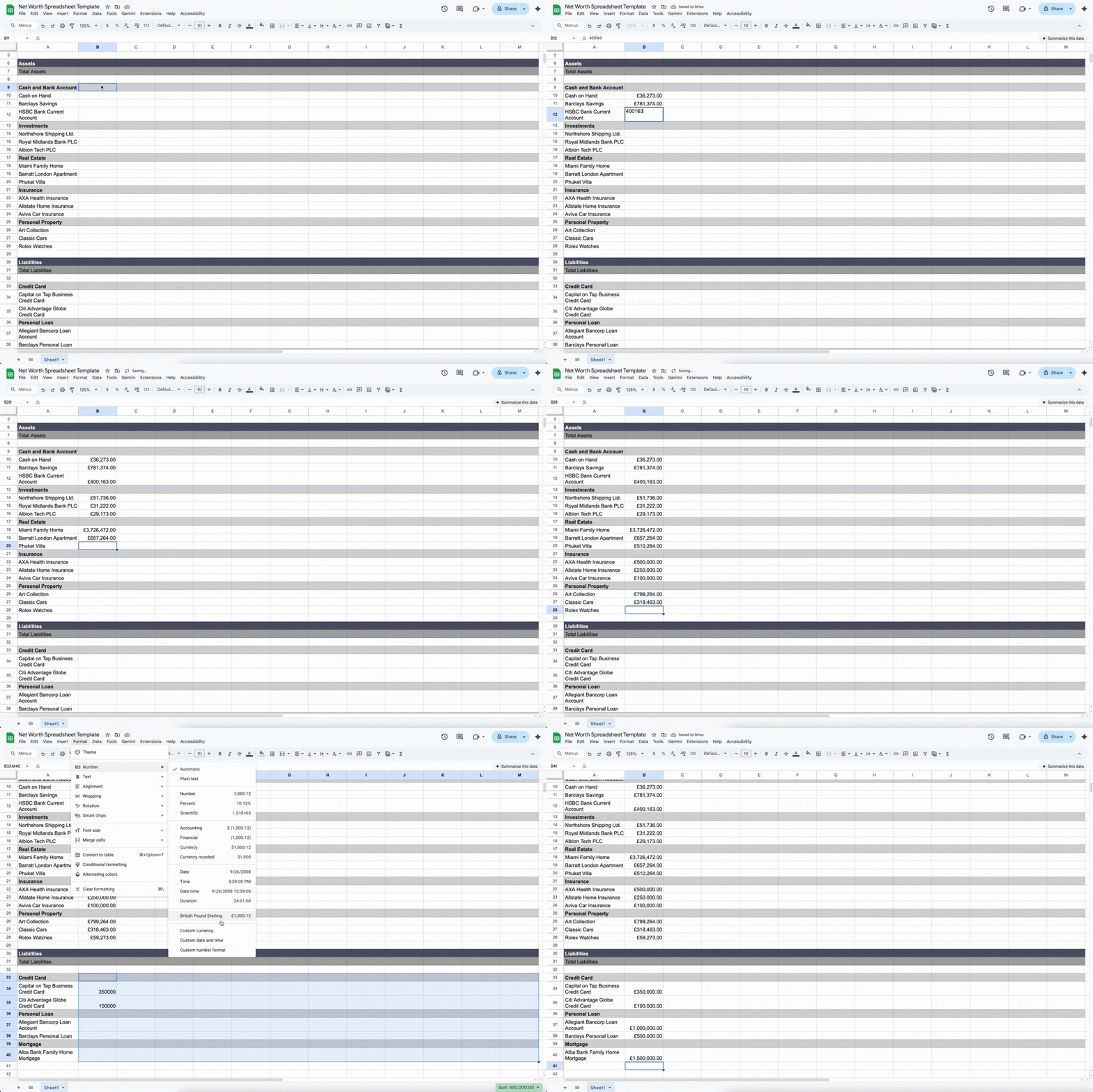
Step 5: Assign Accurate Values
After listing all assets and liabilities, the next step is to assign precise values to each entry. For assets, this means:
- Checking banking apps or statements to enter the current balance of bank accounts.
- Entering appraised or insured values for collectables, vehicles, artwork, and other possessions using official appraisal reports, auction records, or reputable online marketplaces.
- Estimating the current value of properties by consulting online property valuation tools, recent sales of comparable properties, or professional appraisers for homes and rental real estate.
- Reviewing investment accounts, brokerage statements, or financial apps to record the market value of stocks, bonds, mutual funds, or other investment holdings.
Contrarily, for liabilities, this means:
- Checking loan statements to record outstanding balances on personal loans or auto loans.
- Consulting credit card accounts or apps to note unpaid balances and accrued interest.
- Including taxes owed by reviewing recent tax notices or government portals.
- Recording other debts, such as medical bills, utility arrears, or business obligations, using invoices or account statements.
- Reviewing mortgage statements or lender portals to enter current home loan amounts.
Thoroughly documenting assets and liabilities ensures that every part of the financial picture is included, creating a clear and accurate representation of net worth. Equally important is selecting the correct currency to maintain consistency and avoid miscalculations across all entries.
Step 6: Set Formula
Turning a static list into a working financial tool requires linking data through formulas. While setup may take time, these calculations allow the spreadsheet to update automatically with each new entry.
The formulas can then be arranged as follows:
Sub-Totalling Categories
Before calculating the final net worth, each sub-category (i.e., Cash, investments, and credit cards) requires its own summation.
- The Formula: Use the =SUM() function for each grouping. For example, if cash and bank account for January are in cells B10 through B12, the formula would be =SUM(B10:B12).
- When applying the formula to other months or asset categories, simply copy it across and adjust the column letter and row range to match the correct period and grouping.
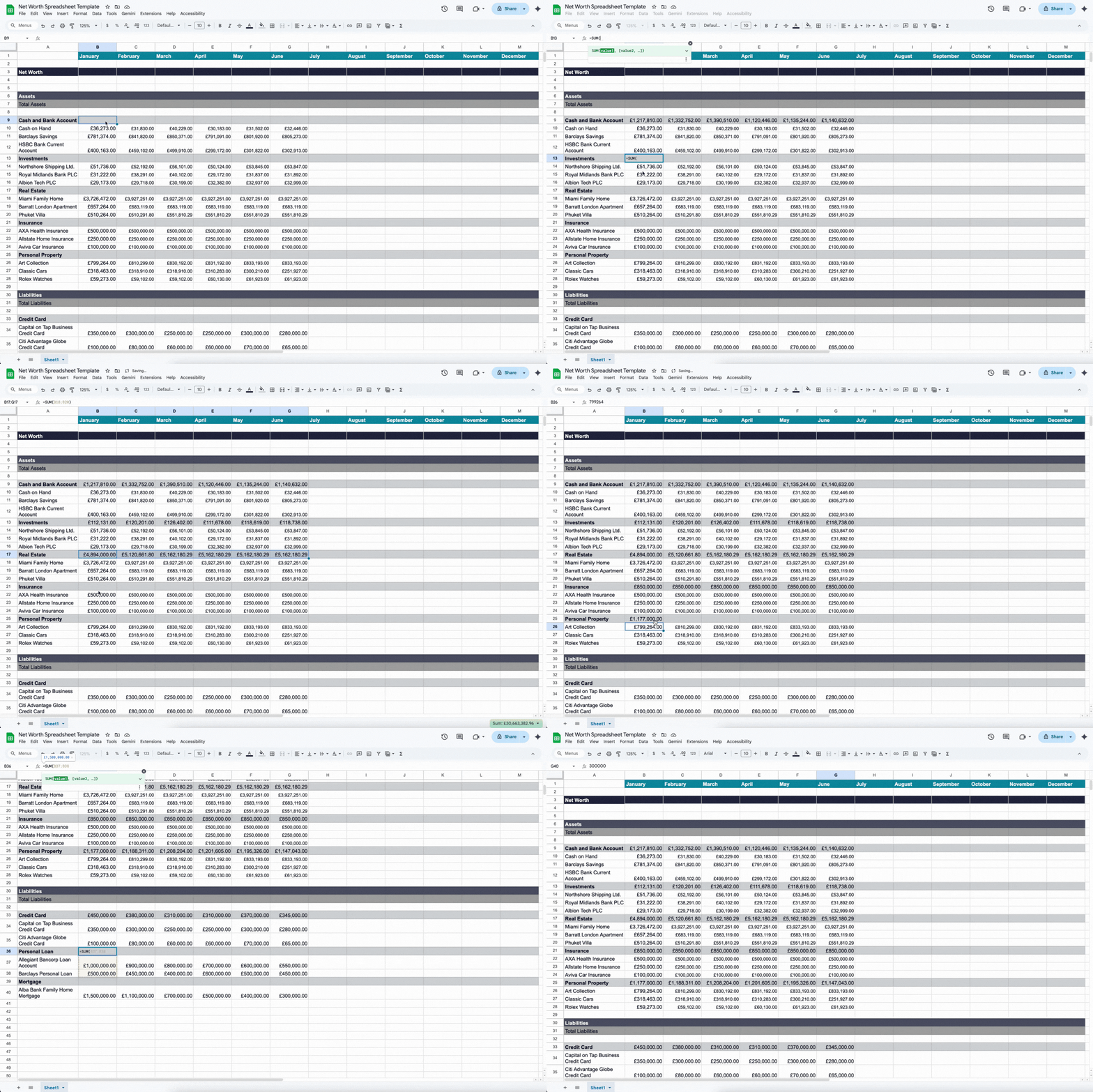
- Top Tip: To quickly copy a formula across cells, drag the fill handle (the small square at the bottom-right of a selected cell) down to the last row of your column.
Calculating Total Assets and Total Liabilities
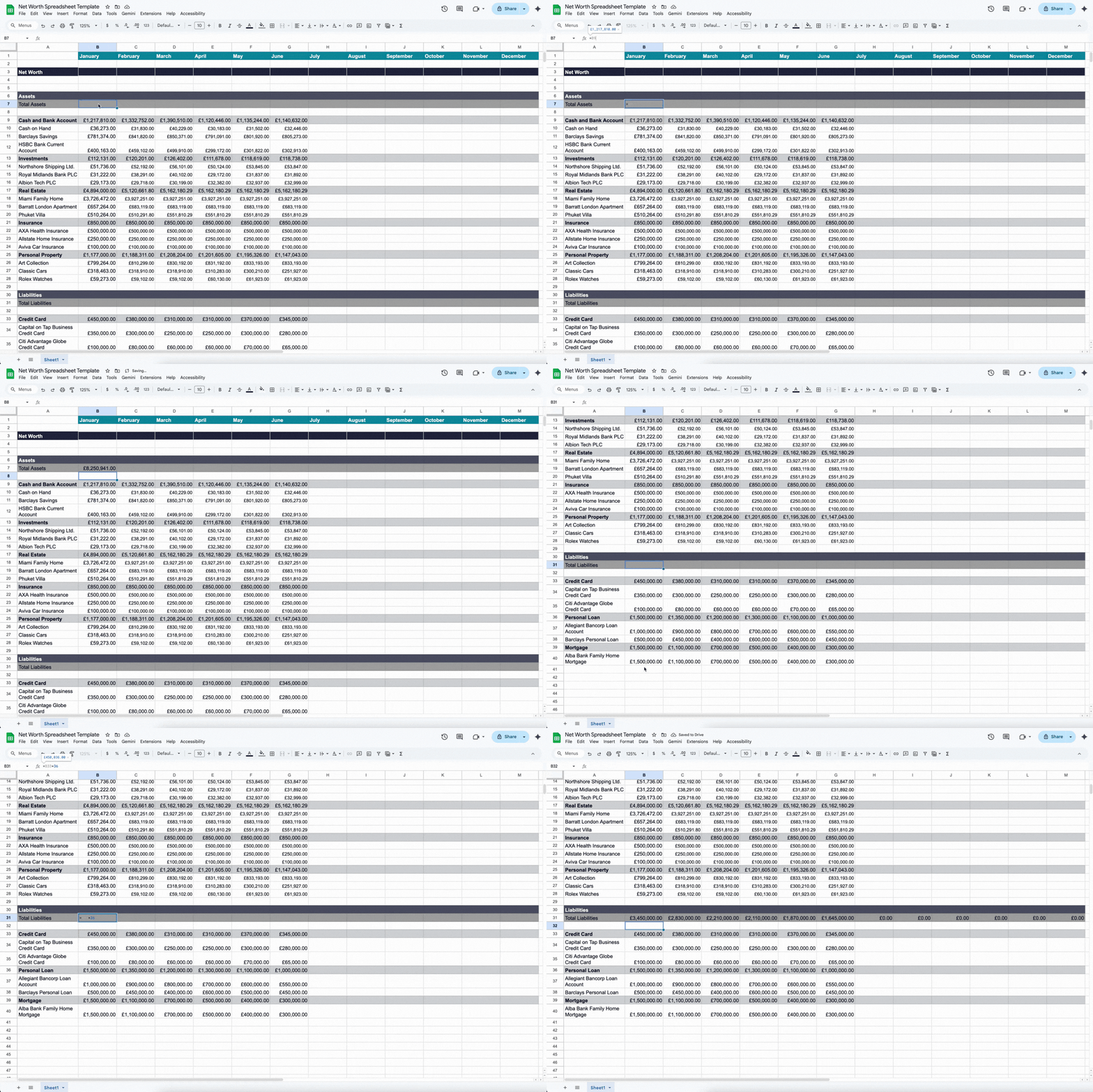
Once subcategories are totalled, create master rows to calculate the total assets and total liabilities.
- Total Assets: Assuming that the subcategory totals are in the bolded rows, a multi-sum formula should be used in the Total Assets cells. For instance, if the first month of data is in Column B, the formula would be: =B9+B13+B17+B21+B25. Each referenced row corresponds to the total for a specific subcategory.
- To calculate totals for other periods, copy the formula across and change the column letter to match the correct timeframe.
- Total Liabilities: Likewise, if the subcategory totals are in bolded rows, combine these figures using a multi-sum formula in the Total Liabilities cell. For example, for the first month in Column B, use: =B33+B36+B39, referencing the total of liability per subcategory.
- Apply the formula to other periods by copying it across and updating the column letter to match the timeframe.
The Net Worth Equation
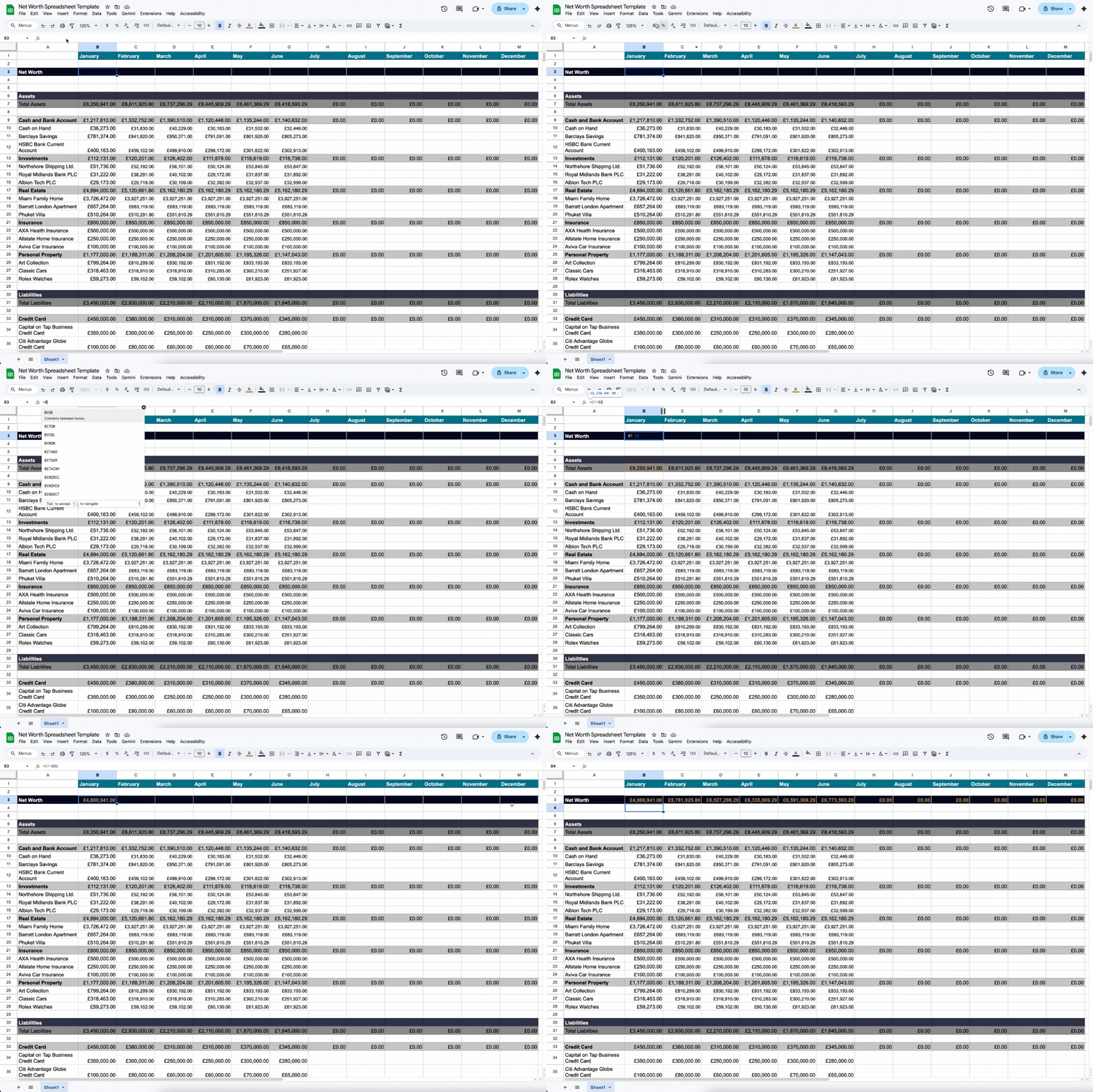
The key figure of the spreadsheet is the net worth, which should be prominently displayed in the summary dashboard at the top. Calculated using the formula: Net Worth = Total Assets – Total Liabilities, this figure provides a snapshot of overall financial health.
When applied to the net worth spreadsheet in Google Sheets, the formula relies on the specific row coordinates of the master summary lines. For example, if the Total Assets are calculated in Row 7 and Total Liabilities are calculated in Row 31, the formula for the first recorded period (Column B) is:
=B7-B31
Since net worth is tracked across multiple periods, the column reference must be updated to match each corresponding timeframe (e.g., Column B for January, Column C for February, etc.). This ensures that the Net Worth calculation dynamically reflects the correct period whenever new data is entered.
Step 7: Add Charts and Graphs
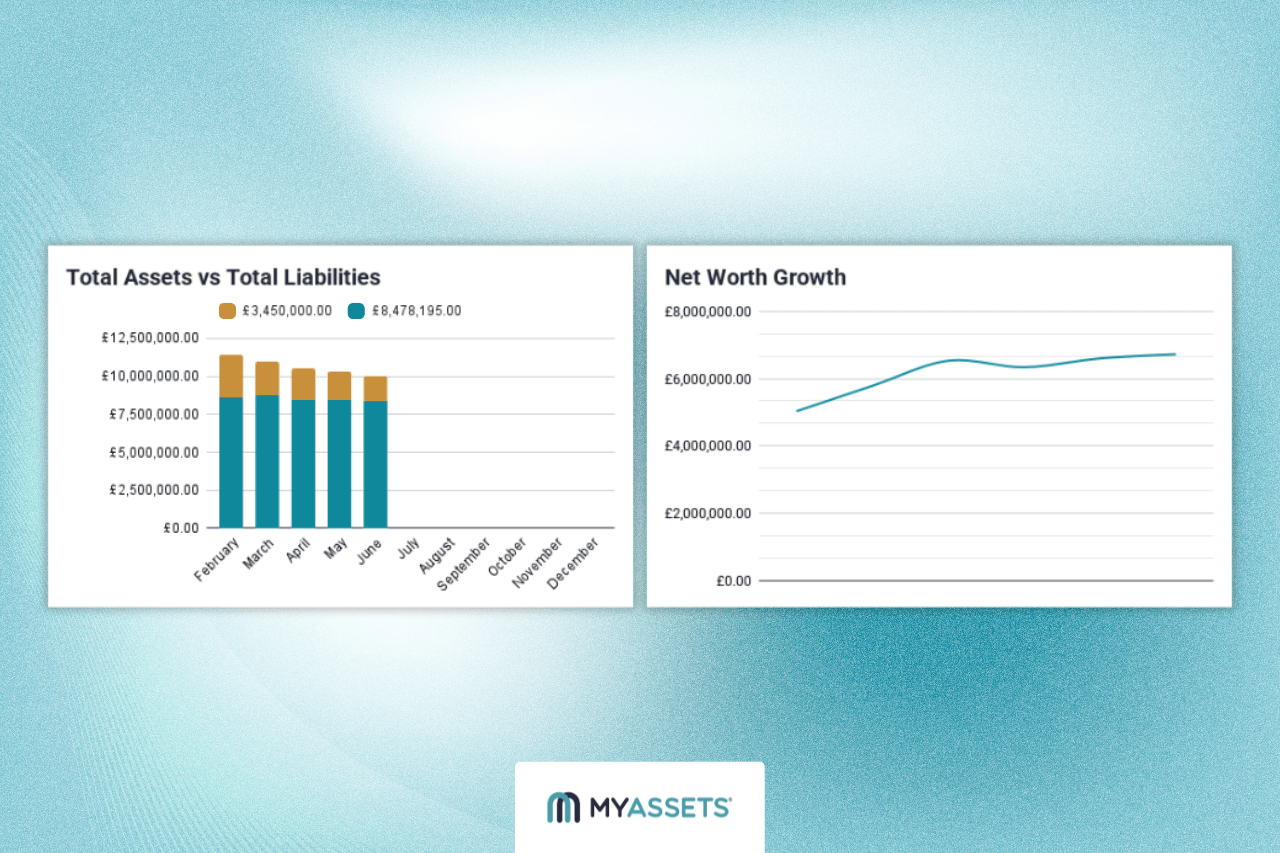
With all data and formulas in place, the final step is to transform the spreadsheet into a visual dashboard by adding charts and graphs. This will provide visual elements assisting users in interpreting trends, patterns, and changes in net worth over time.
Common and effective chart types include:
- Line Charts: Ideal for tracking net worth growth over time, showing upward or downward trends across months or quarters.
- Bar Charts: Useful for comparing total assets and liabilities across periods.
- Pie Charts: Effective for illustrating how assets are distributed across categories (i.e., cash, investments, property).
To keep the visuals clear, charts should draw from summary rows such as Net Worth or Total Assets, rather than granular data. Displaying them at the top or on a separate dashboard sheet creates a streamlined view of key insights.
Tips for Creating a Free Net Worth Spreadsheet
A net worth spreadsheet is one of the most accessible ways to track net worth. With a few practical tips, anyone can create a free yet effective tracker that accurately reflects their current financial standing.
Create Specific Account Names
Instead of a generic label like "Savings," the row should specify the institution or purpose, such as "Barclays Savings" or "AXA Health Insurance."
Generate Custom Metrics and Calculations
The spreadsheet is fully customisable, allowing users to add additional measurements, such as net worth change percentage, asset growth rates, or liability reduction trends. By creating formulas tailored to individual needs, users can extract deeper insights and fully maximise the spreadsheet’s capabilities.
Include Non-Traditional Assets (if applicable)
Assets are not limited to financial accounts; items like vehicles, art, and collectables can be added as well. Listing each on its own row provides a more complete picture of total assets.
Standardise Recording Date
Record all values on the same day each month (i.e., the 30th) to create comparable snapshots of wealth across periods. Consistency ensures that changes in net worth reflect real growth or decline rather than differences in timing.
Building a Simple Net Worth Spreadsheet From Scratch
Transforming a blank sheet into a dashboard of assets and liabilities replaces the guesswork of financial standing with a data-driven approach to tracking wealth.
While the nature of a free net worth calculator spreadsheet requires a degree of technical know-how and a consistent time investment, the reward of full customisation, zero cost, and a deep understanding of money outweighs the initial effort.
By following a structured process for building a net worth spreadsheet template:
- Establishing a time frame.
- Organising asset and liability categories.
- Listing all assets.
- Recording liabilities.
- Assigning values.
- Setting formula.
- Adding charts and graphs.
The spreadsheet evolves into more than just a record. It becomes a dynamic financial tool that updates with every entry and reveals financial insights over time.
In the end, this approach not only delivers a reliable snapshot of net worth but also strengthens financial awareness, empowering more informed decisions in managing wealth.
Free Net Worth Spreadsheet: Frequently Asked Questions
1. What is the formula for net worth?
The formula for net worth is: Net Worth = Total Assets – Total Liabilities. It calculates the difference between everything you own and everything you owe, providing a snapshot of your financial standing.
2. How to build a net worth Tracker?
To build a net worth tracker, create a spreadsheet that lists all assets and liabilities, assigns accurate values, and uses formulas to calculate net worth automatically. For more convenience, especially with complex portfolios, you can use net worth tracker apps, which provide preset categories and dashboards to track and analyse financial data efficiently.
3. Does Google Sheets have a net worth template?
No. While Google Sheets offers customisable templates, it doesn’t have a built-in net worth template. However, you can find free community-shared net worth spreadsheet templates to import and modify, or opt for paid templates and apps that offer more features, preset categories, and automated calculations.
MyAssets: A Net Worth Calculator for Streamlined Wealth Tracking
Building a net worth spreadsheet often starts as a straightforward task, but quickly becomes a time-consuming process of gathering scattered financial data, assigning values, and setting up formulas. What should be a clear snapshot of wealth becomes a cumbersome system that demands ongoing effort to maintain accuracy.
Introducing MyAssets, a net worth calculator that streamlines the entire process by:
- Calculating net worth based on your inputs, removing the hassle of setting formulas yourself.
- Delivering visually appealing charts that make it efficient to see how assets are distributed across your portfolio.
- Offering preset categories for everything, from cash and bank accounts to real estate and collectables, eliminating the manual organising of financial data.
With MyAssets, you move beyond the spreadsheet. You gain a dynamic view of your financial health, allowing you to spend less time managing rows and more time growing your wealth.
One Dashboard for All Assets
Imagine having all assets summarised and neatly organised in one Global Dashboard:
- Finances are categorised into cash and banking, traditional investments, other investments, and insurance policies, alongside a chart showing asset distribution.
- The total value of assets, liabilities, and net value for houses, apartments, and other properties is displayed with the location indicated.
- All valuable collections, including jewellery, artworks, trading cards, and more, are systematically inventoried.
All these assets are consolidated in a single view, allowing users to monitor holdings across every category. On top of that, the platform automatically calculates net worth, meaning all assets added –whether finances, properties, or belongings –are accounted for to provide a clear snapshot of the overall financial picture.
One System for Every Asset
Even better, users can manage relationships between assets with its Smart Asset Linking feature. In practice, this means users can connect related items, such as a family home with its mortgage or the art collection it houses. This helps understand how assets relate to one another and their impact on one’s net worth and portfolio.
One Platform for All Users
MyAssets makes collaboration easy with its Delegates feature, empowering teamwork with family, financial advisors, accountants, or other trusted collaborators.
Users can control access by assigning specific roles:
- View: Allow them to see assets and financial data.
- Create/Edit: Let them add or update entries.
- Delete: Grant permission to remove items if necessary.
With MyAssets, collaborators can contribute efficiently to your collection, while you, the owner, retain full control and oversight of your assets and net worth.
Start tracking your net worth today with MyAssets, free for 14 days.



