


Did you know that comprehensive property profiles are a top priority for modern buyers? In fact, the National Association of Realtors found that buyers rated websites featuring detailed information about property for sale as 77% more useful. This highlights a critical market shift: today’s buyers are data-hungry, and providing an information-rich profile during their home search is vital to shorten the inquiry-to-offer cycle and successfully secure a deal.
A comprehensive property documentation supports this goal by consolidating all information into a single, clear reference point. How so? When essential details are scattered across files, emails, and folders, buying or selling opportunities may slip away.
This is where property profiling becomes essential. It keeps vital information organised, accessible, and available when needed. By presenting complete documentation upfront, you satisfy a buyer's need for transparency before they even pick up the phone.
This raises an important question: How do you create a property profile using property solutions?
Fortunately, this guide saves you the time and frustration of browsing endless tools to digitise your property portfolio. Here, you’ll discover MyAssets, an asset management platform designed to streamline profiling properties through detailed record-keeping and efficient file organisation.
Step by step, you’ll learn how to create a property profile that organises your property portfolio and supports smarter real estate decisions.
- What is a Property Profile?
- Why is a Property Profile Important?
- Create a Property Profile: Step-by-Step Process
- Add Basic Property Information
- Include Additional Details
- Record Finances
- Document Your Property’s Key Areas
- Upload Images and Files
- Tips to Enhance Your Property Profiles with MyAssets
- Property Documentation: The Key to a Transparent Profile
- Property Profiling: Frequently Asked Questions
What is a Property Profile?
A property profile is a detailed document or digital record that outlines the characteristics and background of a specific real estate asset. It typically includes information, such as:
- Market Data: Market analysis of nearby properties and calculated property value.
- Ownership Records: Current owner names, parcel numbers, and deeds.
- Property Features: Physical characteristics, including land size, floor area, number of bedrooms, bathrooms, and car spaces.
- Sales and Transaction History: Prior sale amounts, dates of transactions, and, if applicable, rental history.
- Other Information: Property assessments, zoning info, and sometimes local amenities or school information.
By aggregating these details in one place, a property profile helps home buyers, sellers, and real estate professionals evaluate a property and make informed decisions.
Key Uses of a Property Profile
Once a property profile is created, its value goes beyond simple record-keeping. From asset management to safety and compliance, a comprehensive profile serves multiple purposes that benefit both seller and buyer.
- Asset Management: A profile helps you monitor maintenance history, insurance renewals, and tax obligations, supporting the lifecycle management of your property-,What%20is%20Property%20Management%3F,-Property%20management%20involves).
- Marketing and Sales: Empowers agents to move beyond generic listings. Detailed data allows for hyper-targeted marketing that attracts high-intent buyers and justifies a premium asking price.
- Safety and Compliance: Centralises critical property documentation, including fire safety and structural permits. This proactive organisation mitigates legal risks and prevents deal-killing surprises during inspections.
Why is a Property Profile Important?
The property profile offers a clear snapshot of a property’s physical features, market value, and transaction history, serving as the foundational source of truth for all stakeholders. But its value doesn’t stop there; several other benefits make property profiles indispensable:
Building Buyer Trust and Credibility
Transparency is the ultimate currency in real estate. By proactively sharing property management documents and a detailed history of the home, sellers signal openness and build trust with potential buyers.
This upfront transparency helps minimise surprises during inspections, reducing the chances of buyer’s remorse or cold feet and keeping the transaction moving forward with greater confidence.

Read More: The Best Places To Buy Property Abroad for Investors
Streamlined Transaction
With 66% of realtors embracing technology primarily to save time, providing your agent with a pre-made property profile is a massive advantage.
Instead of spending hours tracking down paperwork or answering routine questions like “What is the property’s square footage and lot size?”, your agent can focus on high-value tasks such as marketing, networking, and negotiating the best possible offer for your property.
Create a Property Profile with MyAssets: Step-by-Step Process
Creating a property profile may seem daunting, but breaking it down into actionable steps makes the process straightforward. The following guide walks you through each stage using MyAssets, helping you organise essential information and build a complete profile for your property.
Step 1: Add Basic Property Information
Once you select the add button and choose the MyProperty icon from the menu, you can start entering the primary details of your property investment.
In MyAssets, these fields are required as they serve as the main identifiers for your property asset. Completing them ensures your profile remains accurate and distinguishable.
To build a functional property profile, you will need to provide the following:
- Name: A unique identifier for your property (i.e. London Vacation Home).
- Address: The official location of your property, including street, city, and state.
- Purchase Date: The date you acquired the property.
- Purchase Price: The amount paid to acquire the property.
- Current Value: The property’s estimated value today.
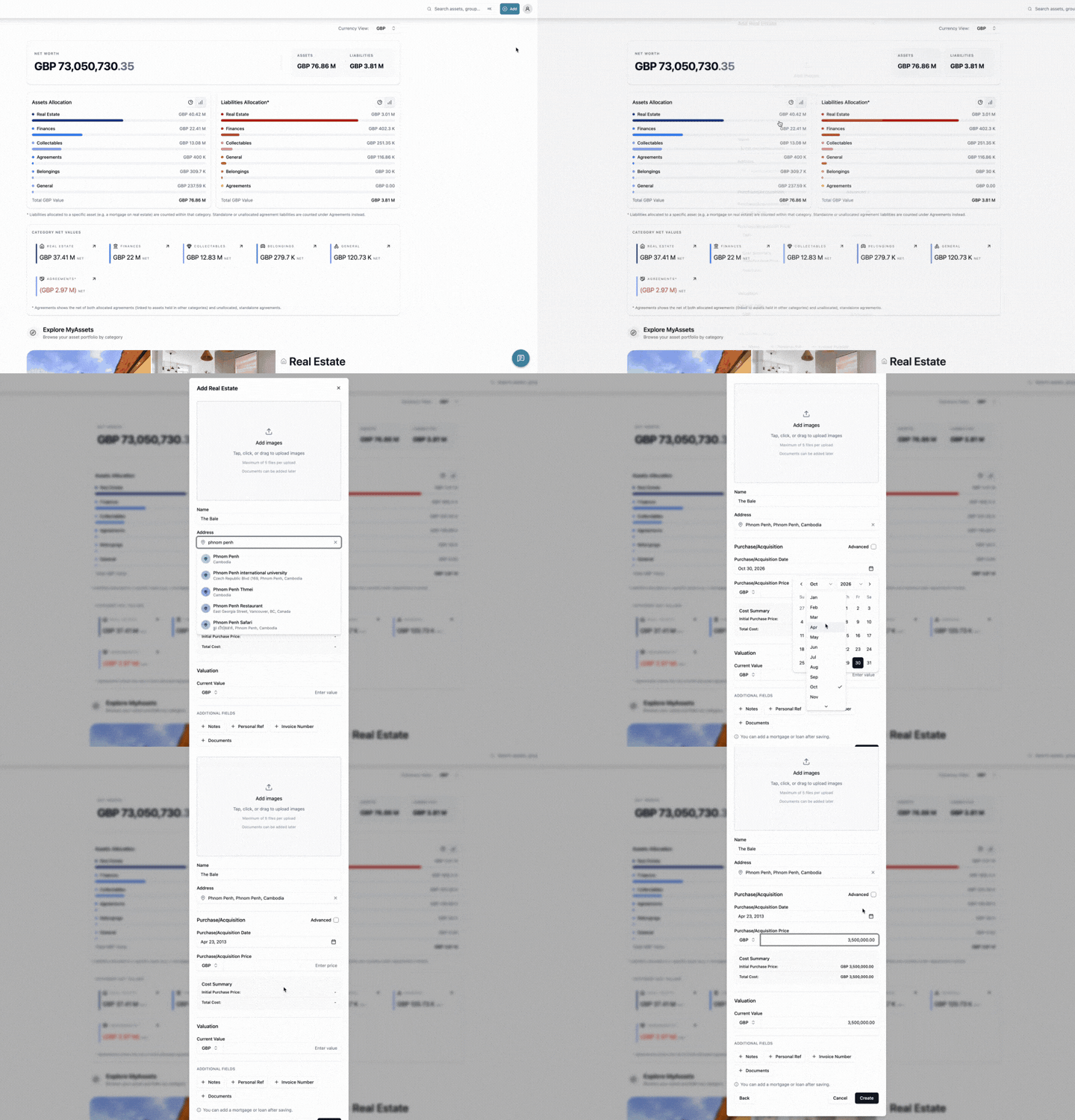
At this point, you can select create to add the real estate asset, but if you want to add more details, proceed to the next step.
Step 2: Include Additional Details
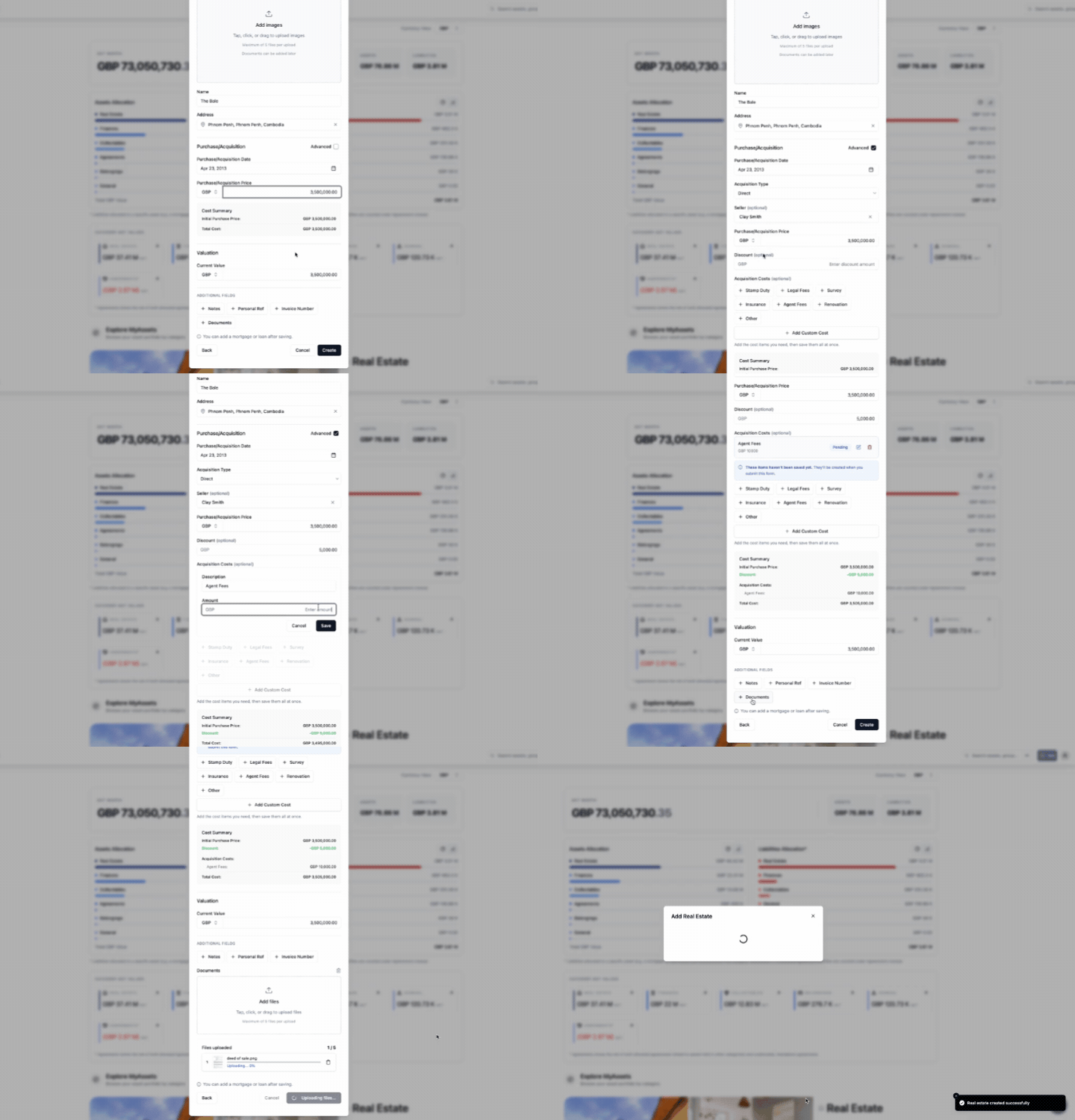
For a more detailed description of your property, you can select Advanced and start adding other information, including:
- Acquisition: Add purchase details for your property and additional costs.
- Acquisition Type
- Seller
- Acquisition Costs
- Discount
- Additional Fields: Select additional details you wan to include in your property record.
- Notes
- Personal Ref
- Invoice Number
- Documents
Step 3: Record Finances
The purchase price and current value you entered in Step 1 help you track your property’s worth for asset valuation. But what about the mortgage or other liabilities tied to it? From mortgage to ongoing maintenance expenses, MyAssets lets you record these financial obligations, giving you a clearer picture of its overall financial position. Here’s how to add them:
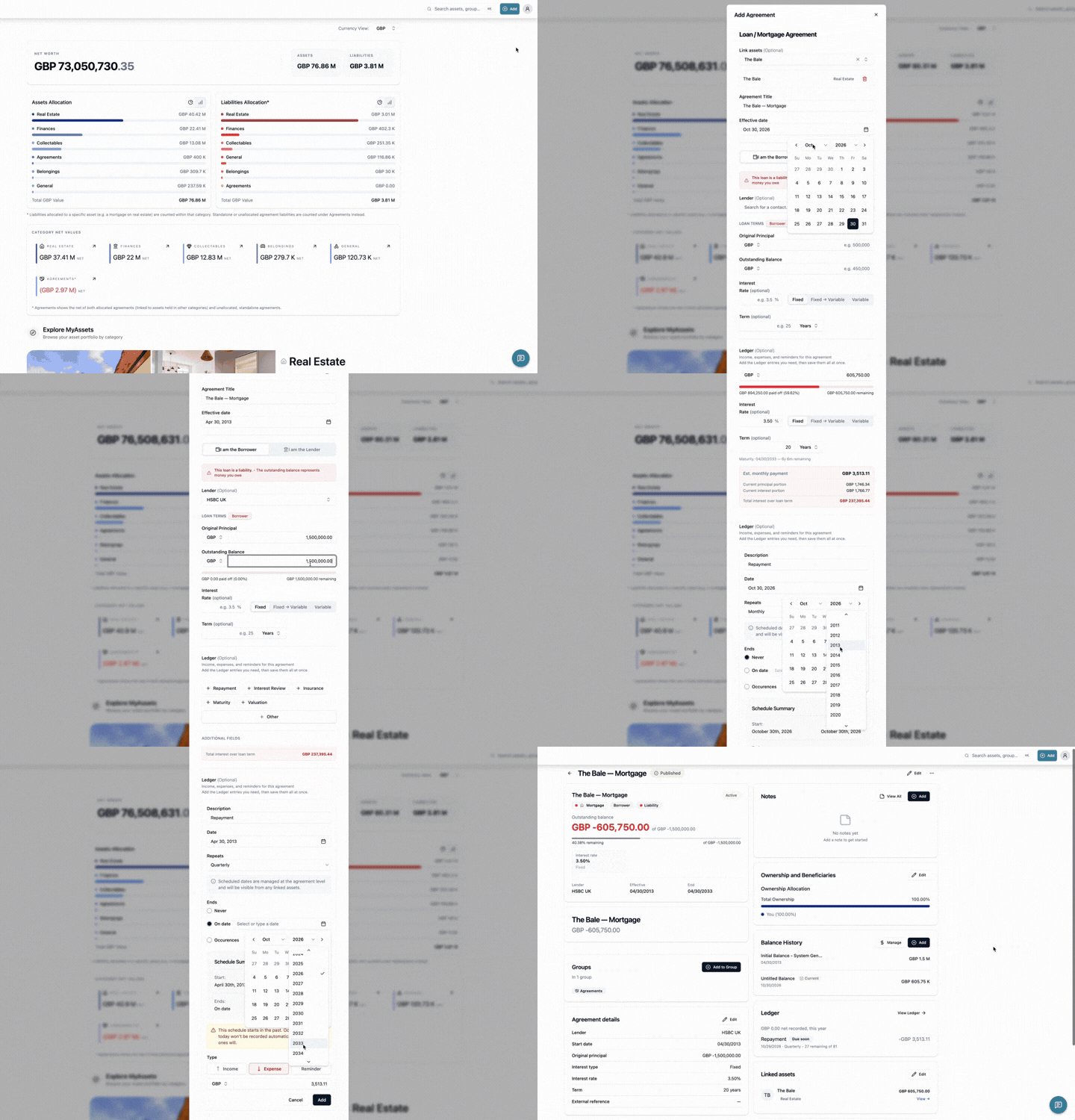
Adding Mortgage to Your Property
Once you’ve created your property profile, follow these steps to add a mortgage to a property:
a. Click the Add button. b. Select the Agreements icon. c. Select Loan/Mortgage as the agreement type you are adding. d. Add the required fields: Agreement Title and Effective Date. e. In the Link assets field, enter the real estate asset to be linked to this agreement. f. Select I am the Borrower so the agreement reflects as your mortgage (i.e. a liability). g. Add other details. h. Select Create Agreement.
Although a mortgage is recorded as a separate financial entry, the Smart Asset Linking feature connects it to your property.
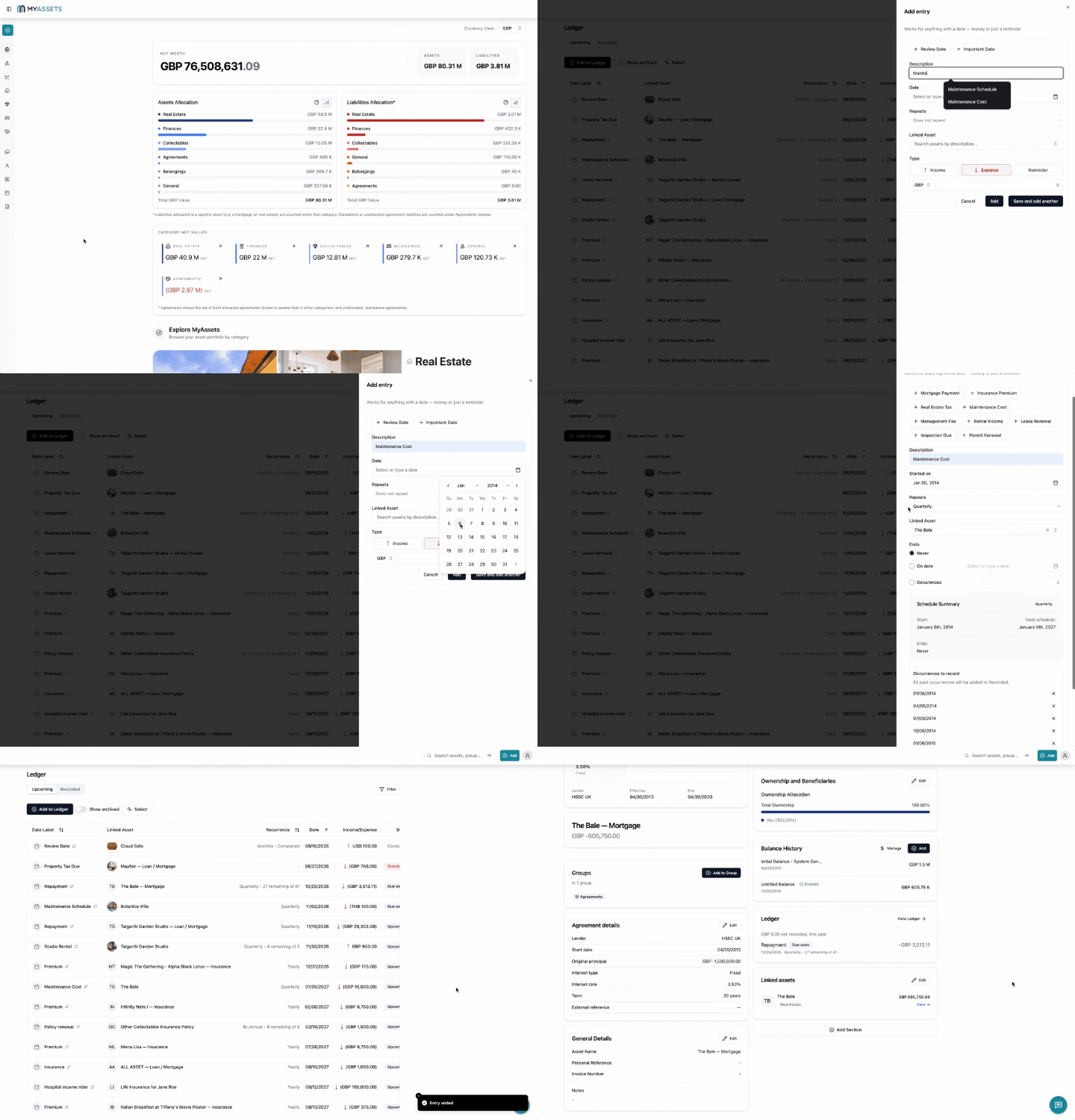
Adding Property Expenses in Ledger
Use MyAsset’s Ledger to add property-related expenses, such as maintenance fees, repairs, and utility bills. Here’s how:
a. Select the Ledger icon from the left navigation panel. b. Select Add to Ledger. c. At this point, you can either select: Upcoming (unrealised transactions) or Recorded (completed transactions) entries. d. Add the required fields.
- Description: Specify what the expense is for, such as maintenance costs, electricity bill, or plumbing repair.
- Date: Select when the scheduled event occurs.
- Repeats: set how often the scheduled date recurs.
- Linked Asset: select the asset associated with the scheduled date.
- Ends: schedule when a recurring date ends; only appears for Repeat scheduled dates.
- Type: select Expense, then enter the amount spent on the property.
In this way, MyAssets ties your debt to your property, providing real-time net worth calculations and consolidating liability data in your real estate profile.
Step 4: Document Your Property’s Key Areas
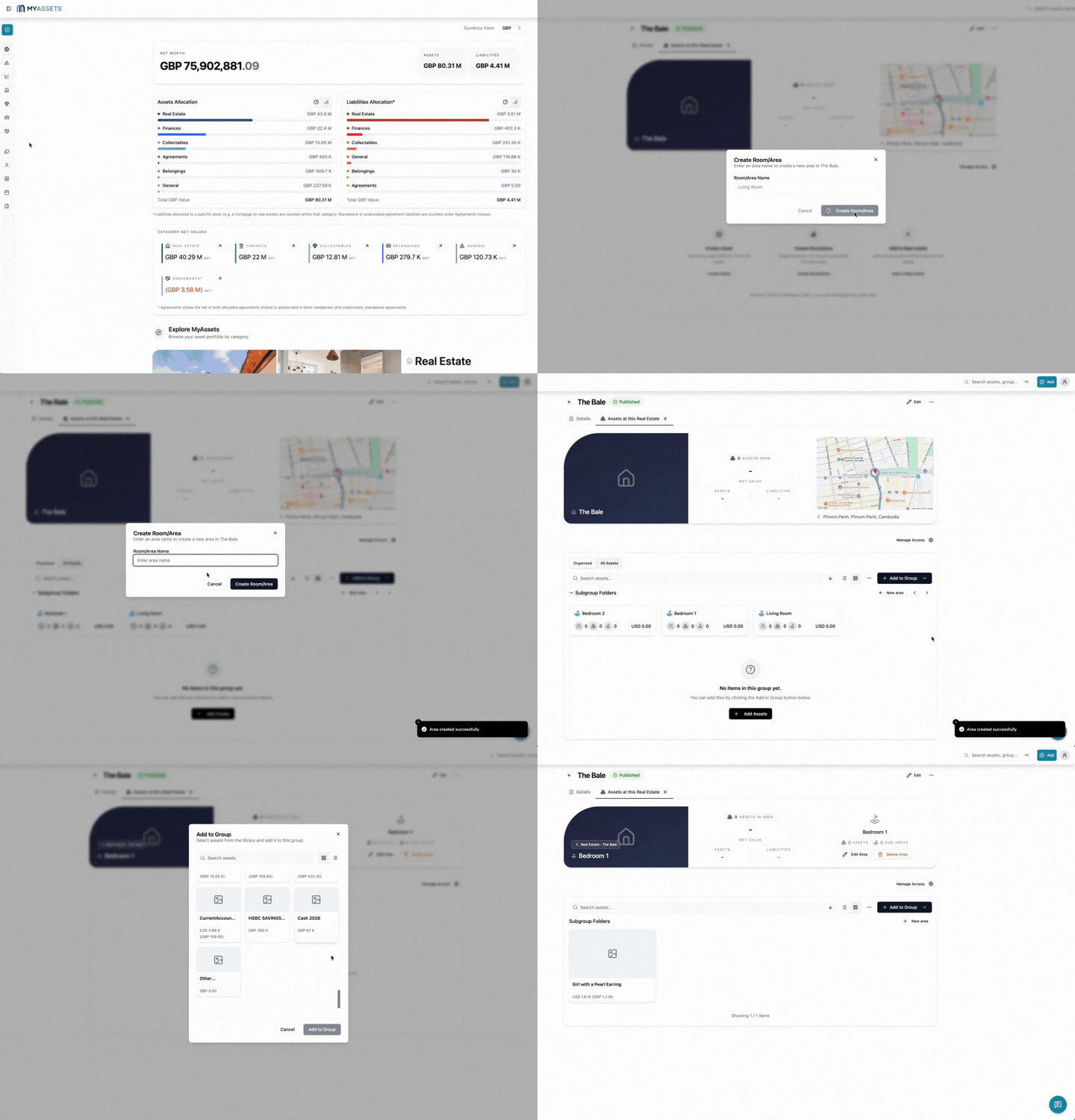
Document the rooms or areas that make up your property, such as the living room, bedroom, or storage room. With MyAssets, you can use Location Groups to create areas within a real estate asset.
Follow these steps to get started:
a. Select the Groups icon from the left navigation panel. b. Select Location. c. Select the real estate asset you want to update. d. Select the Add to Group button. e. Select Create Room/Area from the dropdown menu. f. Enter the area name, then select Create Room/Area.
Capture every nuance that a standard property portfolio template often misses with MyAssets' tools. By recording areas, you create a high-definition profile that satisfies today’s data-hungry buyers.
Step 5: Upload Images and Files
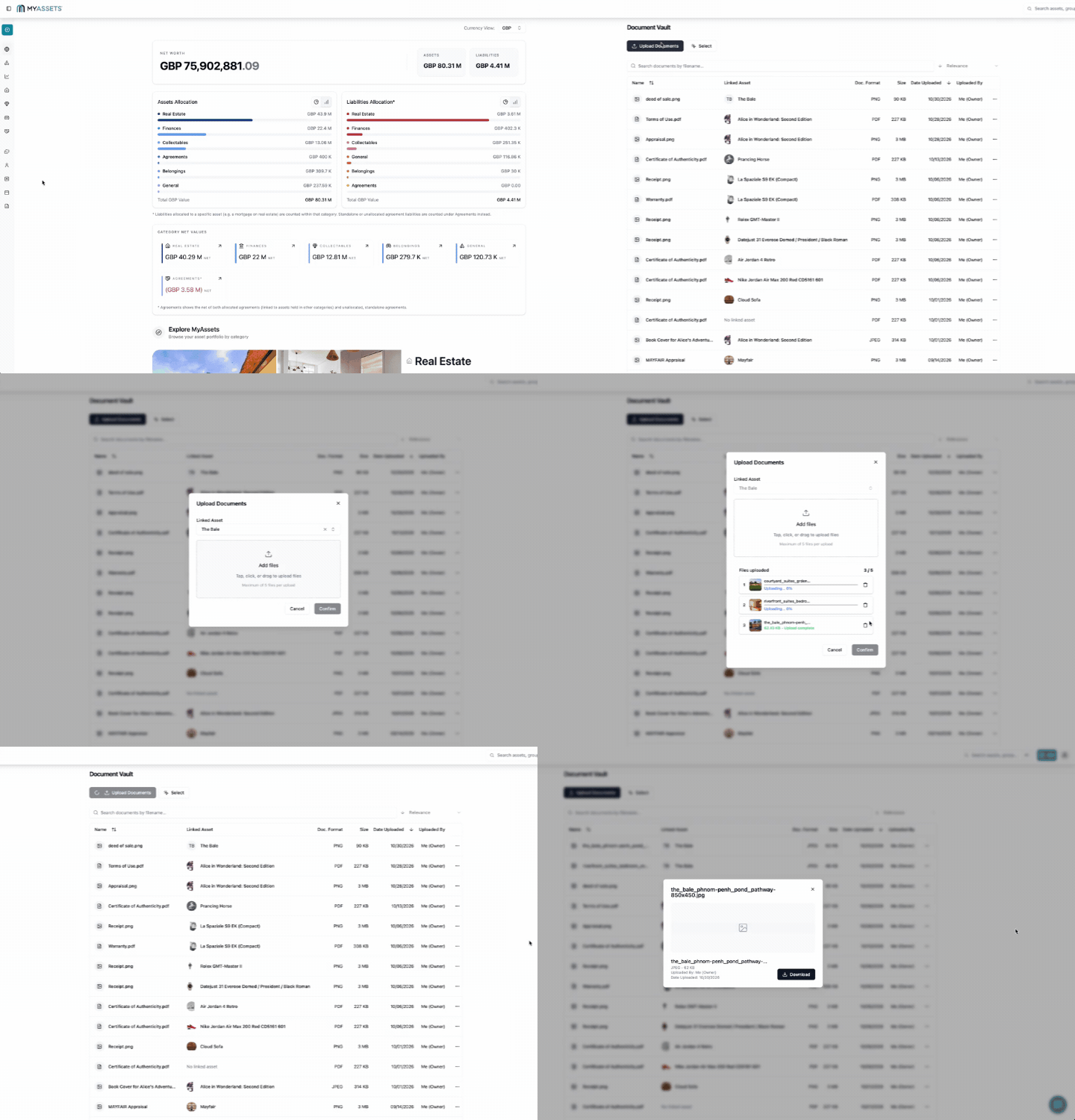
From property images that help you identify your asset to documents that verify ownership, MyAssets makes it easy to keep everything together. You can upload files when adding a property entry or upload them later in the Document Vault.
Here are the key images and documents to upload:
Images
- Amenities (parking, pool, common area)
- Exterior Photos (front, back, street view)\
- Floor Plans
- Interior Photos (rooms, kitchen, bathrooms)
- Map
- Renovation or Upgrade Photos
Property Documents
- Building Permits
- Deeds (i.e., Master Deed, Deed of Sale)
- Insurance Policies
- Loan Documents
- Property Survey
- Tax Declarations and Receipts
- Title
- Zoning Documents
Each uploaded file is stored in its appropriate section within the property profile. This ensures that all visual references and documents are organised and readily available for review, sharing, or future updates.
See More: From Spreadsheets to Smart Platforms: Best Tools for Growing Your Rental Portfolio
Tips to Enhance Your Property Profiles with MyAssets
To get the most out of your property profile, it’s important to go beyond the initial setup. These tips will help you improve and maintain it over time with MyAssets.
1. Keep Information Updated
Regularly review and update your property profile to ensure all details remain accurate. This includes:
- Financial data (i.e. market value)
- Maintenance records
- Renovations
- Supporting documents
Ideally, review your profile at least once every quarter or immediately after significant changes, such as renovations, new assets, or financial updates. MyAssets makes this straightforward, allowing you to edit your property profile to keep all data information accurate and up to date.
Beyond basic updates, MyAssets provides specialised tools to track the entire lifecycle of your investment:
- Mark the Property as Sold: Formalise the exit of an asset by adding final sale details, including the sale price, applicable taxes, and buyer information.
- Rent Out Your Property: Detail rental properties by recording tenant name, property manager, introducing agent, lease dates, security deposits, income amount, and special rental terms.
In this way, your property profile becomes a living document –fully up to date, comprehensive, and ready to provide accurate information at any stage, whether for buyers, tenants, or property portfolio management.
2. Organise Documents
Store legal, financial, and maintenance records in clearly structured categories for easy access. MyAssets places strong emphasis on organisation through its Document Vault, where files are automatically categorised under each property. This structured system makes data retrieval seamless, ensuring that important documents are always within reach.
3. Organise Properties by Groups
If you manage multiple properties, organisation becomes even more important. With MyAssets’ Group feature, you can categorise properties based on your preferred criteria:
- City
- Purchase Date
- Investment type
This allows you to personalise your portfolio structure and efficiently locate specific properties when needed.
Property Documentation: The Key to a Transparent Profile
Creating a property profile is more than a simple data entry task; it is a strategic investment in building trust and streamlining your real estate transactions.
With MyAssets, you can start building an estate profile by completing the following steps:
- Add Basic Property Information
- Include Additional Details
- Record Finances
- Document Your Property’s Key Areas
- Upload Images and Files
In this way, you transform scattered information into a comprehensive, organised, and professional profile, which supports every stage of the buying or selling process.
More importantly, when your property documentation is thorough and accessible, you eliminate the fear of the unknown, allowing you to respond to inquiries with instant transparency and accurate information.
Property Profiling: Frequently Asked Questions
1. What is the purpose of a profile?
A profile highlights the essential details of a subject, from people to buildings or art. In property, it presents a clear, organised view of the asset, helping buyers, sellers, and agents understand its value and unique features.
2. Can I update my property profile after it’s created?
Yes. Regularly updating your profile ensures accuracy, reflects renovations or changes, and keeps financial and legal information current, which is important for potential buyers or investors.
3. How to create a property profile template?
To create a property profile template, outline the key sections, including basic property information, financial details, physical features, legal documents, and visual references.
MyAssets: The Complete Solution for Property Documentation
In a market where information is the ultimate currency, an information-rich property profile ensures your asset doesn't just sit on the market –it stands out, builds instant credibility, and secures the deal you deserve. Introducing MyAssets, a complete asset management platform designed to help you through the meticulous process of cataloguing your property.
From the moment you acquire your first property to the time you sell or upgrade, MyAssets delivers a seamless experience: it organises financials, tracks physical features, stores legal documents, and centralises photos and files –all in one place.
A Property Profile that Goes Beyond Basics
While basic details such as property address, purchase price, purchase date, and property type may be enough to distinguish a property, MyAssets empowers you to go further. It captures details that go beyond surface-level information, including:
- Acquisition: Covers purchase details and additional costs.
- Location: Details your property address, like floor or unit numbers.
- Ownership: Adds your shareholders and allocates ownership.
- Configuration: Provides specific details about your property’s layout, such as the size, type, and number of rooms.
Centralise Property-Linked Assets in One Profile
What’s more, you can connect related assets directly to your property for a complete view of its value. This includes financial liabilities, including mortgages and loans, collectables such as artworks and antiques, and belongings like furniture and other electronics.
With Smart Asset Linking, you can link everything to a single property, creating a unified profile that reflects not just the asset itself, but everything associated with it.
Share Property Information with Trusted People
Managing a property with a partner, friend, or agent? MyAssets’ Delegates feature lets you assign roles and control exactly what others can do within your property profile.
- View: Delegates can view property assets.
- Edit: Delegates can view and edit property assets.
- Admin: Delegates can view, edit, and delete assets.
This ensures the right people have access to the right information, while keeping your property data secure and organised.
Build smarter, more complete property profiles with MyAssets, FOR FREE.



