Do you have savings across multiple bank accounts? More common than many might think. In 2024, 49% of UK adults with a savings account spread their funds across two to four providers –up from 44% in 2022, according to Statista. This included credit union savings accounts, cash ISAs and NS&I bonds.
Indeed, there is a good reason to keep savings in different accounts: not all savings are for the same purpose. One account might be used for a new car, another for a house deposit, while another for retirement. Separating these pots can make it easier to organise savings and stay focused on what each pot is working towards.
At the same time, managing those funds is becoming almost entirely digital, with 75% of UK adults now relying on mobile banking to check balances, make payments, and manage their money, said UK Finance.
The catch? More accounts mean more to track.
Juggling bank accounts usually means switching between apps, remembering different login details and calculating total balances manually. While having multiple savings accounts keeps goals organised, they make seeing a complete picture of banking assets more complicated than it needs to be.
This is where learning how to track bank accounts in one place becomes beneficial. It helps individuals understand the process of bringing balances from multiple connected banks together, organising them, and monitoring them in one view, making it more efficient to gather financial data and stay on top of savings.
So, how can you keep track of all bank accounts? Luckily, this article breaks down the features of an app that tracks all bank accounts, explains how MyAssets can support the process, and walks through a step-by-step guide to tracking multiple accounts with MyAssets.
- Key Features Of An App That Tracks All Bank Accounts
- How Can MyAssets Help Track Bank Accounts?
- How To Track Bank Accounts with MyAssets
- Create a Free MyAssets Account
- Connect Bank Account
- Enter Bank Accounts Manually
- View Banking Assets in Cash & Banking Dashboard
- Create Subgroups to Organise Bank Accounts
- Bank Account Tracking: From Scattered Balances To One View
- Track My Bank Account: Frequently Asked Questions
Key Features Of An App That Tracks All Bank Accounts
Beyond recording basic bank details like account numbers, the best bank account trackers provide features, including:
Multi-Bank Connection
Do you have a savings account with HSBC UK, a current account with Lloyds Bank, and another account with Barclays? Multi-Bank Connection consolidates account information from different providers. This feature allows users to connect eligible bank accounts to view their balances and account details in one place.
So, what account types do bank account trackers support? Here are the most common ones:
- Current Account
- Savings Account
- Multi-Currency Account
- Credit Card Account
With multiple accounts connected to one platform, users can access their bank information in one place instead of switching between providers.
Financial Dashboard
Accounts from different providers make it challenging to see the full value of all banking assets. A financial dashboard brings clarity to this fragmented data by consolidating bank accounts and key information in one place.
This begs the question: what information can a financial dashboard display? Generally, it provides an overview of connected accounts, including:
- Account Type - the category of account.
- Currency - the currency in which each account balance is held.
- Current Balance - the latest balance of the account.
- Total Balance - the combined balance across connected accounts.
Together, users gain a summary of their accounts across providers, making it seamless to view both individual and overall finances.
Net Worth Calculation
While tracking bank account balances helps individuals understand part of their financial assets, it does not provide a complete view of their financial position. Other assets, such as properties and investments, as well as liabilities such as mortgages and loans, also contribute to overall wealth.
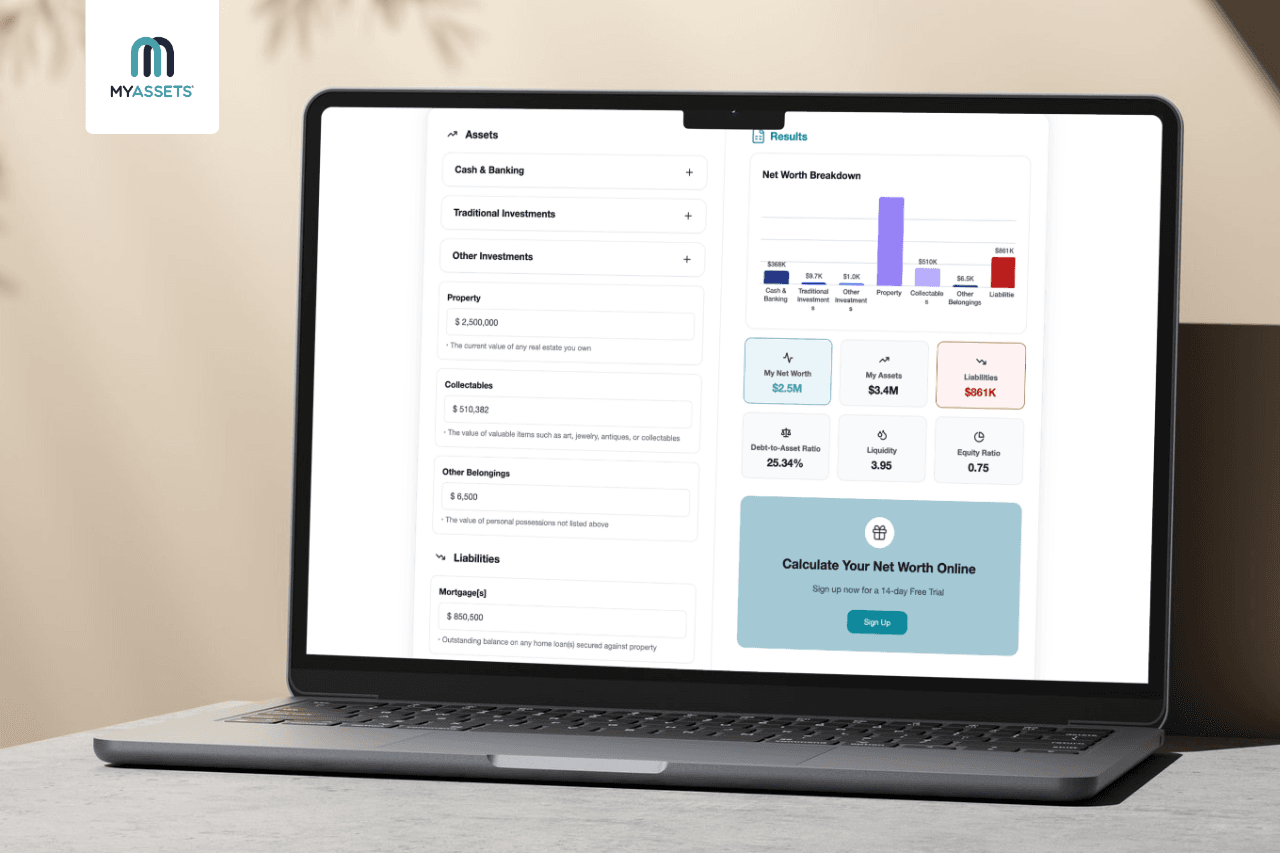
This begs the question: how do you get your full financial picture? One way is to calculate net worth, which represents the difference between an individual’s total assets and total liabilities.
An app with a net worth calculation feature can bring this information together by combining balances from connected bank accounts with the value of other assets and liabilities. Generally, it can account for:
- Bank Accounts - balances held across connected current, savings and other eligible accounts.
- Other Assets - cash in hand, the value of properties, investments, collectables and other assets.
- Liabilities - outstanding mortgages, loans, and other financial obligations.
Overall, these figures give users a more complete view of their financial position, rather than looking at bank balances in isolation.
How Can MyAssets Help Track Bank Accounts?
First, what is MyAssets? MyAssets is an asset management platform that helps users organise, track, and manage their assets across finances, properties, collectables, and belongings in one place.
For those looking to track all bank accounts in one app, a platform like MyAssets serves as a financial aggregator, allowing users to connect and consolidate bank accounts, streamlining balance viewing, record-keeping, and financial management.
So, how can MyAssets help with bank account tracking? Here are the functions that the platform offers:
Import Multiple Bank Accounts
MyAssets uses Plaid, an authorised payment institution, to connect bank accounts on the platform. Plaid encrypts the data users choose to share, such as bank balances, and securely transfers it to MyAssets, where it can be viewed and tracked in one place.
This way, users eliminate logging in to multiple banking apps and recording account balances.
Provide Cash and Banking Dashboard
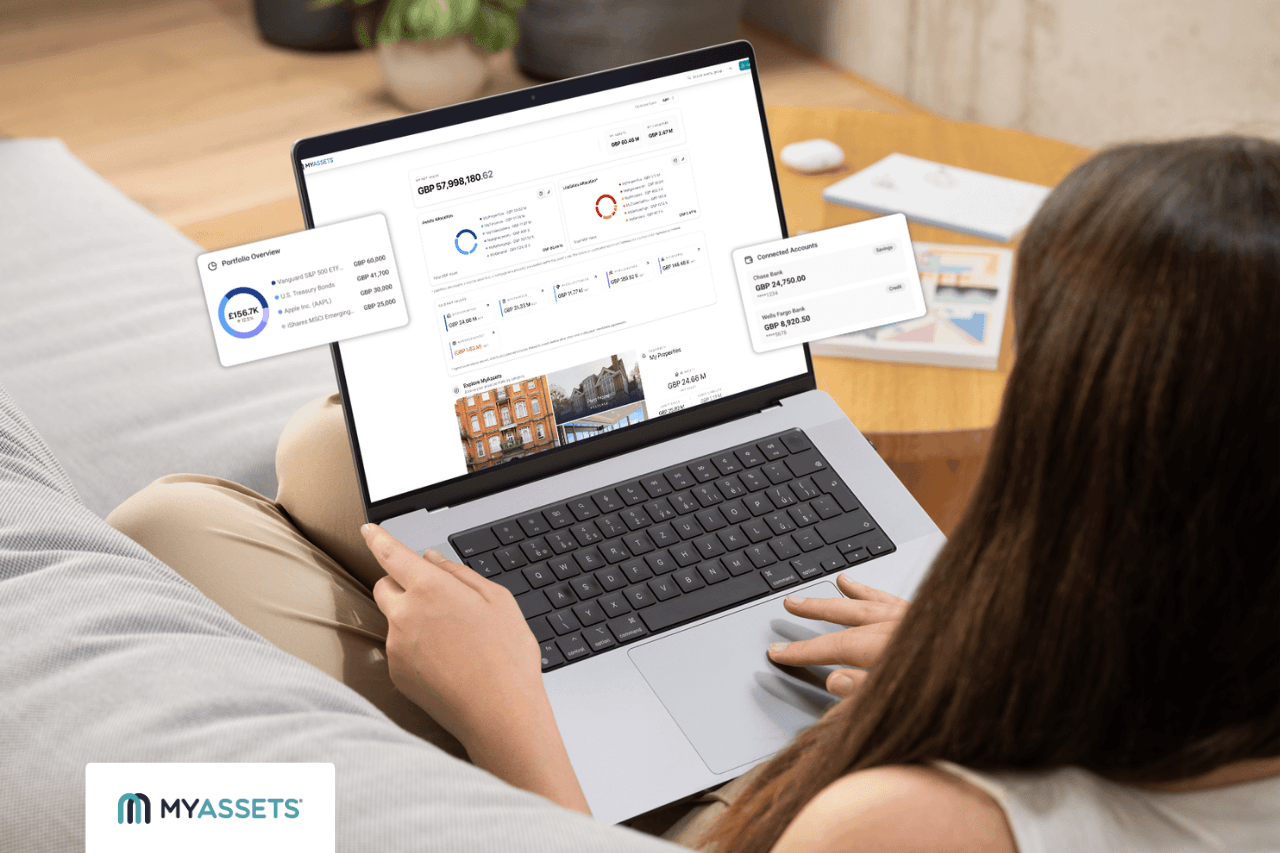
Want to view all bank accounts in one view? MyAssets provides a Cash and Banking Dashboard that brings multiple bank accounts in a single view.
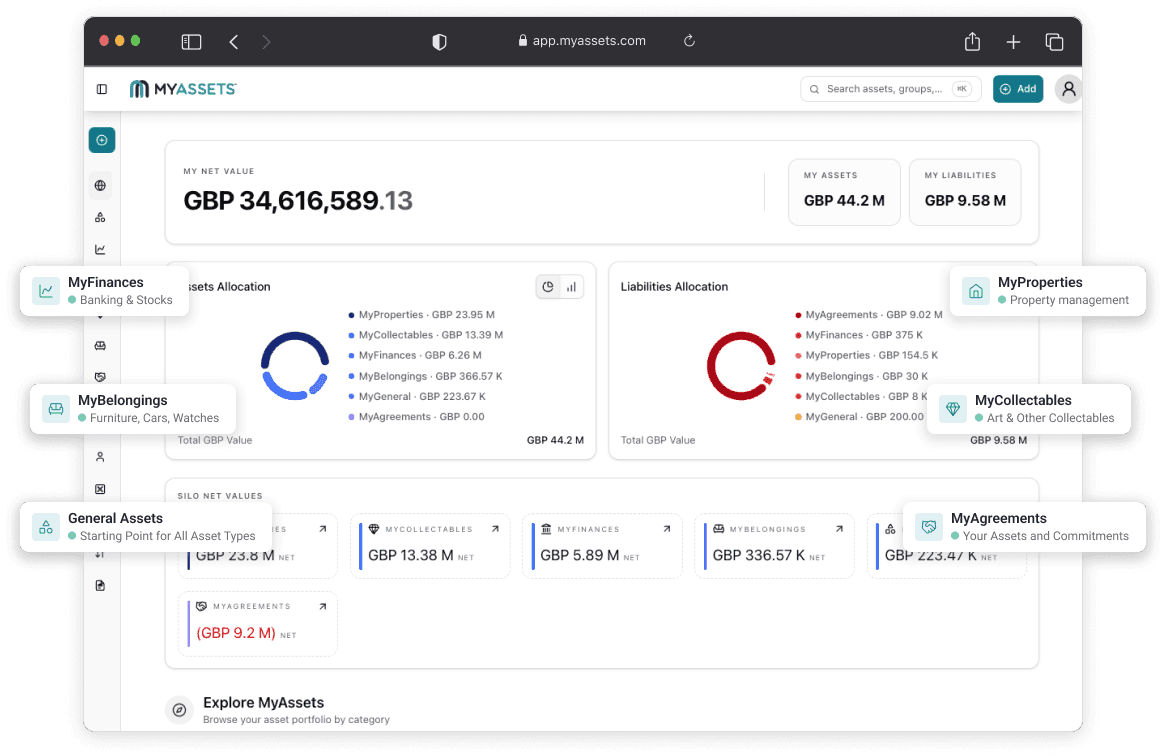
What’s more? MyAssets displays the total asset value, total liabilities and net value under the Cash and Banking category. This helps users see how much they hold across their bank accounts, how much they owe, and the resulting net value of their cash and banking assets –all in one place.
Organise Bank Accounts in Groups
Whether managing multiple current, currency, or savings accounts across different banks, MyAssets enables users to organise them by grouping accounts based on their preferred categories.
For example, users can create a group for multiple current accounts held with the same bank. This keeps related accounts together, allowing users to locate and manage them according to how they have organised their finances.
How To Track Bank Accounts with MyAssets
Do you know how to track bank accounts in one app? MyAssets provides a streamlined way to add, organise and monitor account information in one place. With MyAssets’ free version supporting up to 25 assets, users can start tracking their bank accounts at no cost.
To start tracking bank accounts, MyAssets offers two options: Connect Bank Account or Enter Bank Accounts Manually. Follow the steps below to learn how to use each method.
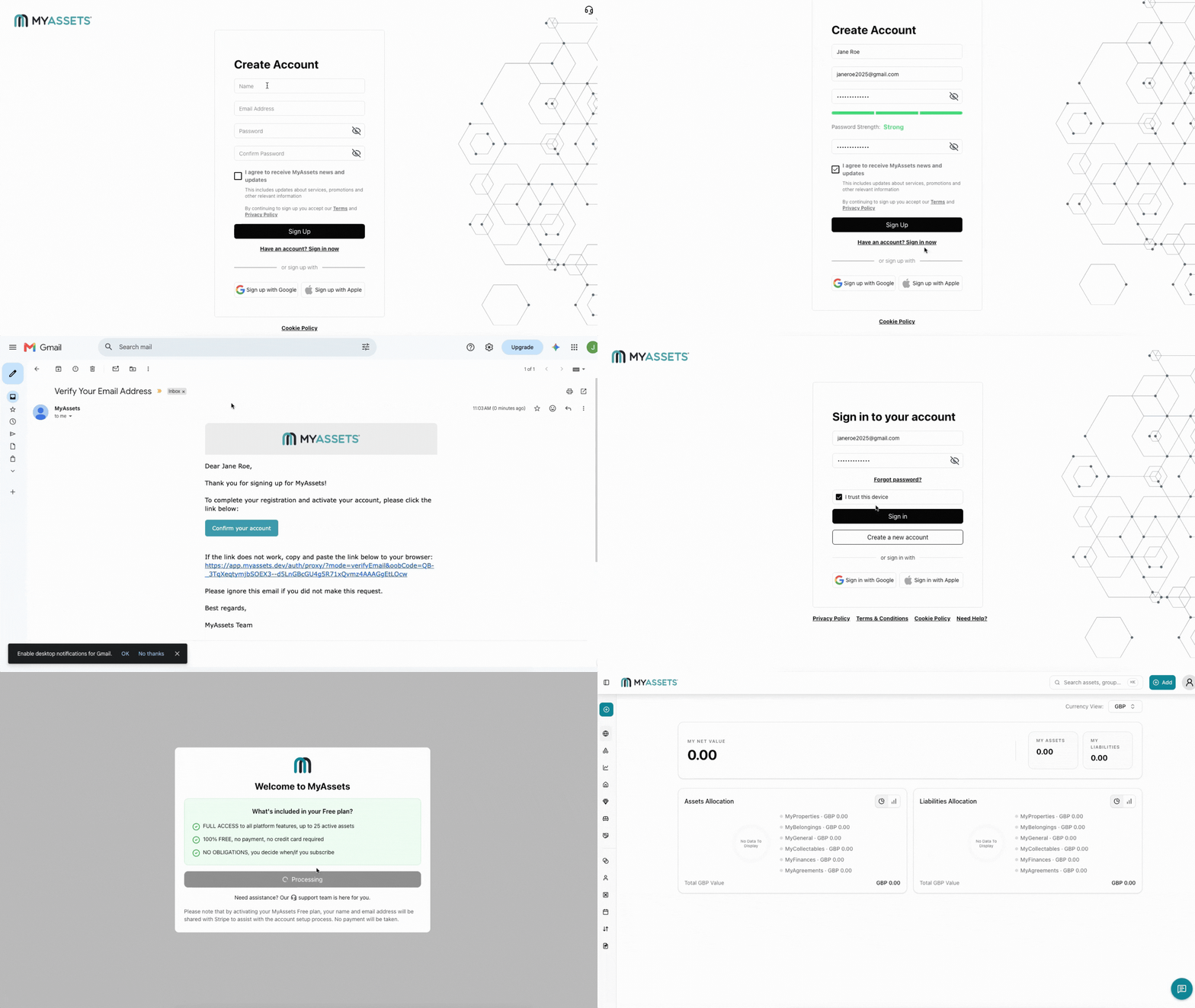
1. Create a Free MyAssets Account
Go to app.myassets.com/auth/signup/ and complete the required fields to create a MyAssets account. This includes:
- Name
- Email Address
- Password
- Confirm Password
Once completed, follow the next steps:
- Select Sign Up.
- Go to the registered email address and select the verification link to verify the email.
- Enter the verified email address and password on the sign-in page.
- Select Sign In.
Do you want to sign up with a social account? Select Sign up with Google or Sign up with Apple. Note that this option limits access to certain account security settings, such as changing the password or enabling two-factor authentication.
2. Connect Bank Account
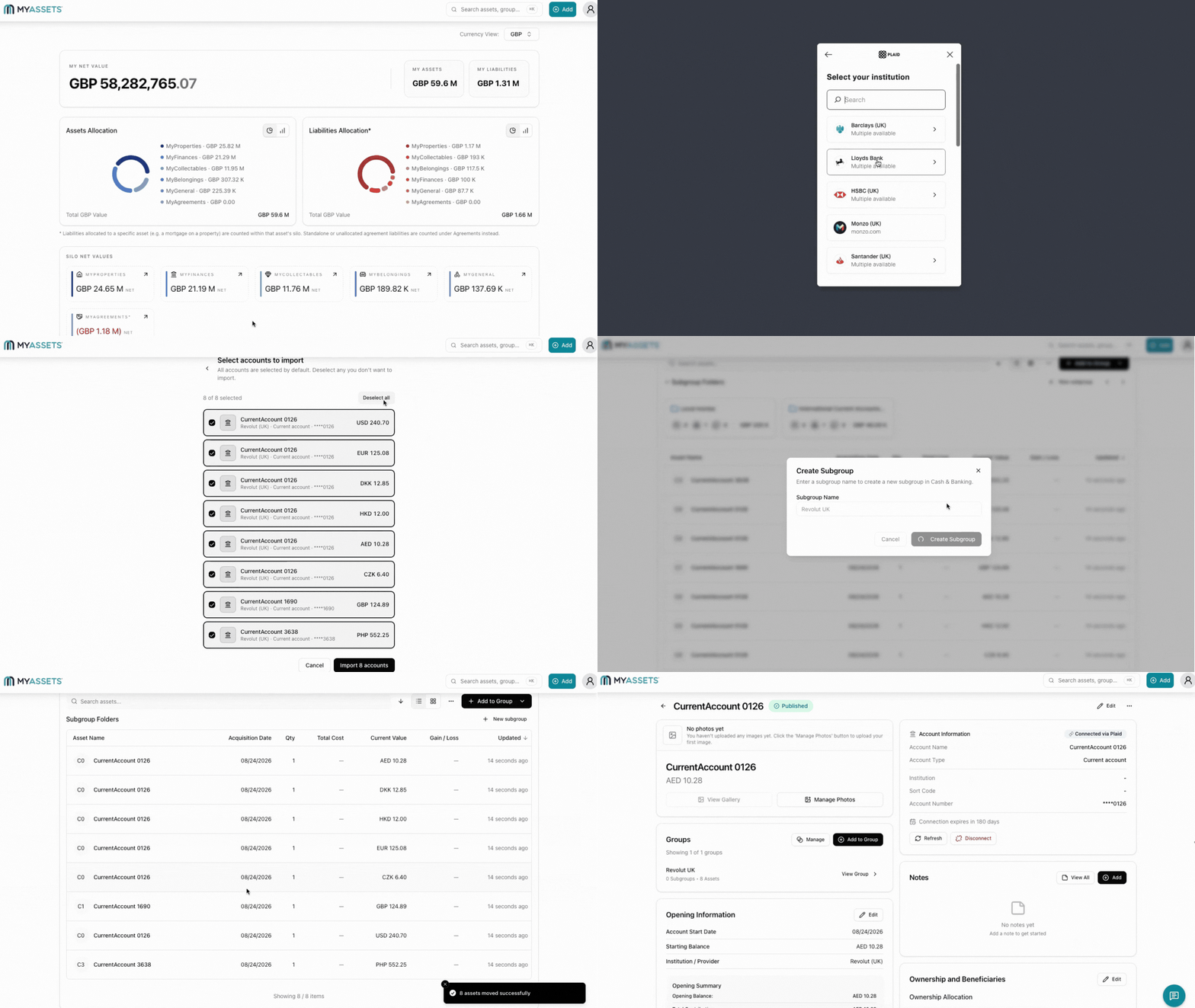
Connect Bank Account is the fastest way to add bank accounts to MyAssets. It connects the platform to Plaid, which automatically imports account details and balances. This option is best for users with accounts from select financial institutions in the United Kingdom and the European Union who want to minimise manual data entry and keep connected account information up to date.
To start connecting a bank account, here’s how:
- Select the Add button.
- Select the MyFinances icon from the menu.
- Select Cash & Banking.
- Select Connect Bank Account.
- The user will be redirected to the Plaid page. Select Continue.
- Select or search for the bank institution.
Note: If the bank is not available, enter the bank account manually (proceed to step 3).
- Scan the generated QR code with the phone camera to confirm the connection in the banking app.
- Select which accounts to import. Users can select multiple accounts at a time.
- Select Import accounts.
3. Enter Bank Accounts Manually
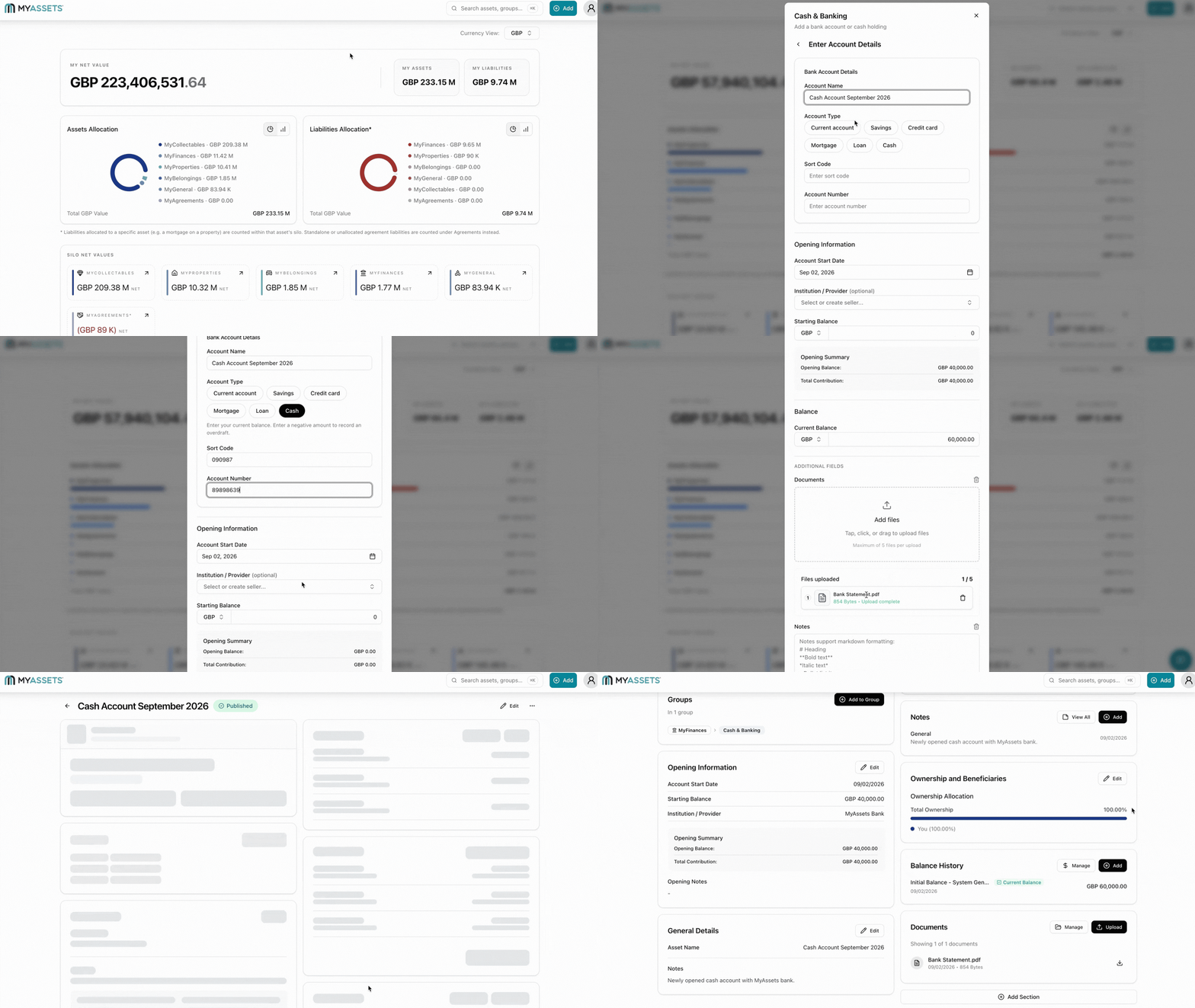
Users can also add a bank account manually by entering its details themselves. This method is ideal for users who prefer not to connect their bank account, as well as users whose bank or financial institution is not eligible for connection through Plaid.
To start entering bank accounts manually, here’s how:
- Select the Add button.
- Select the MyFinances icon from the menu.
- Select Cash & Banking.
- Select Enter Manually.
- Add Account Details.
- Select the Account Type.
- Add Opening Information.
- Add Balance.
- Select any of the applicable Additional Fields to add relevant information about the account.
- Select Create.
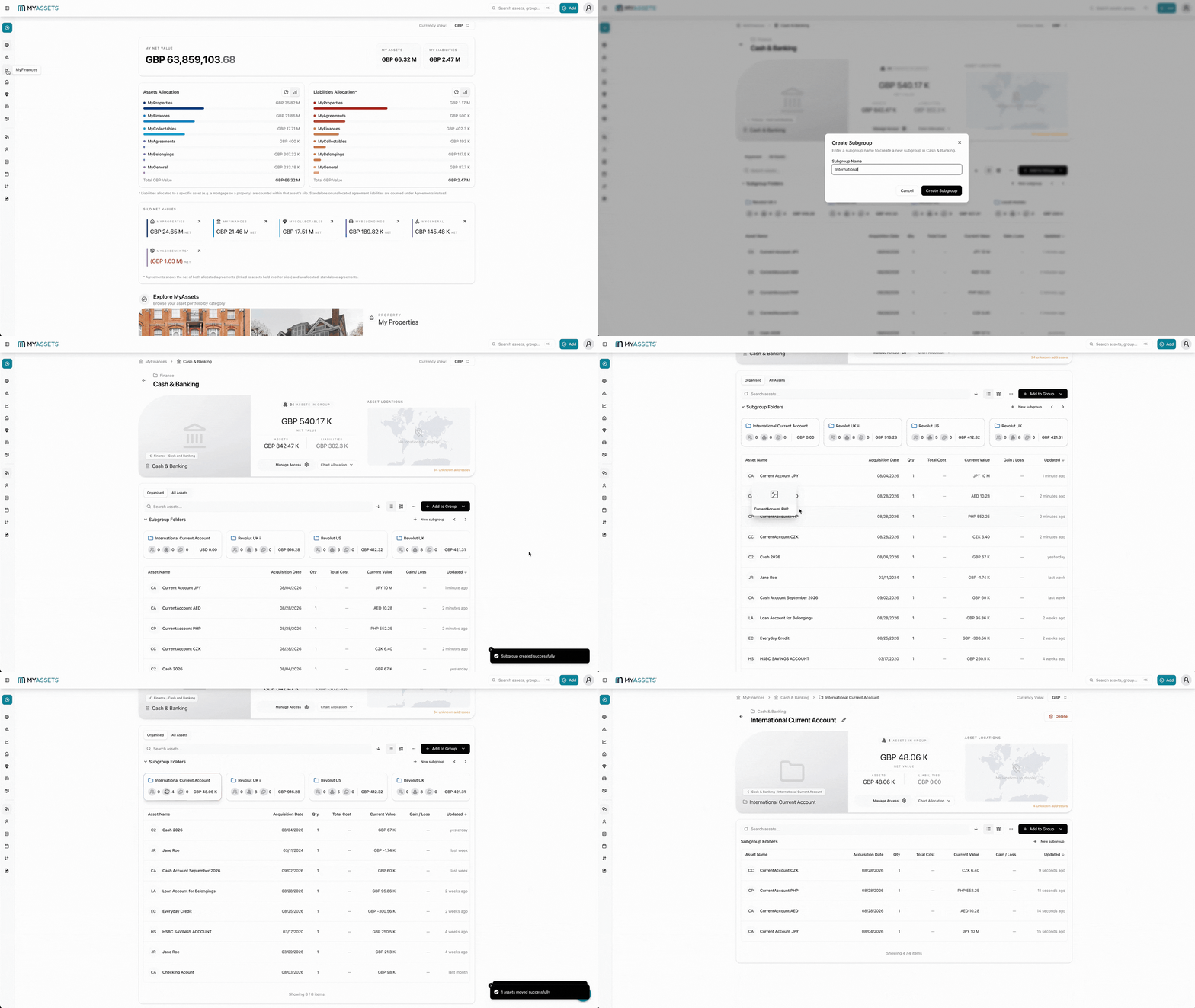
4. View Banking Assets in the Cash & Banking Dashboard
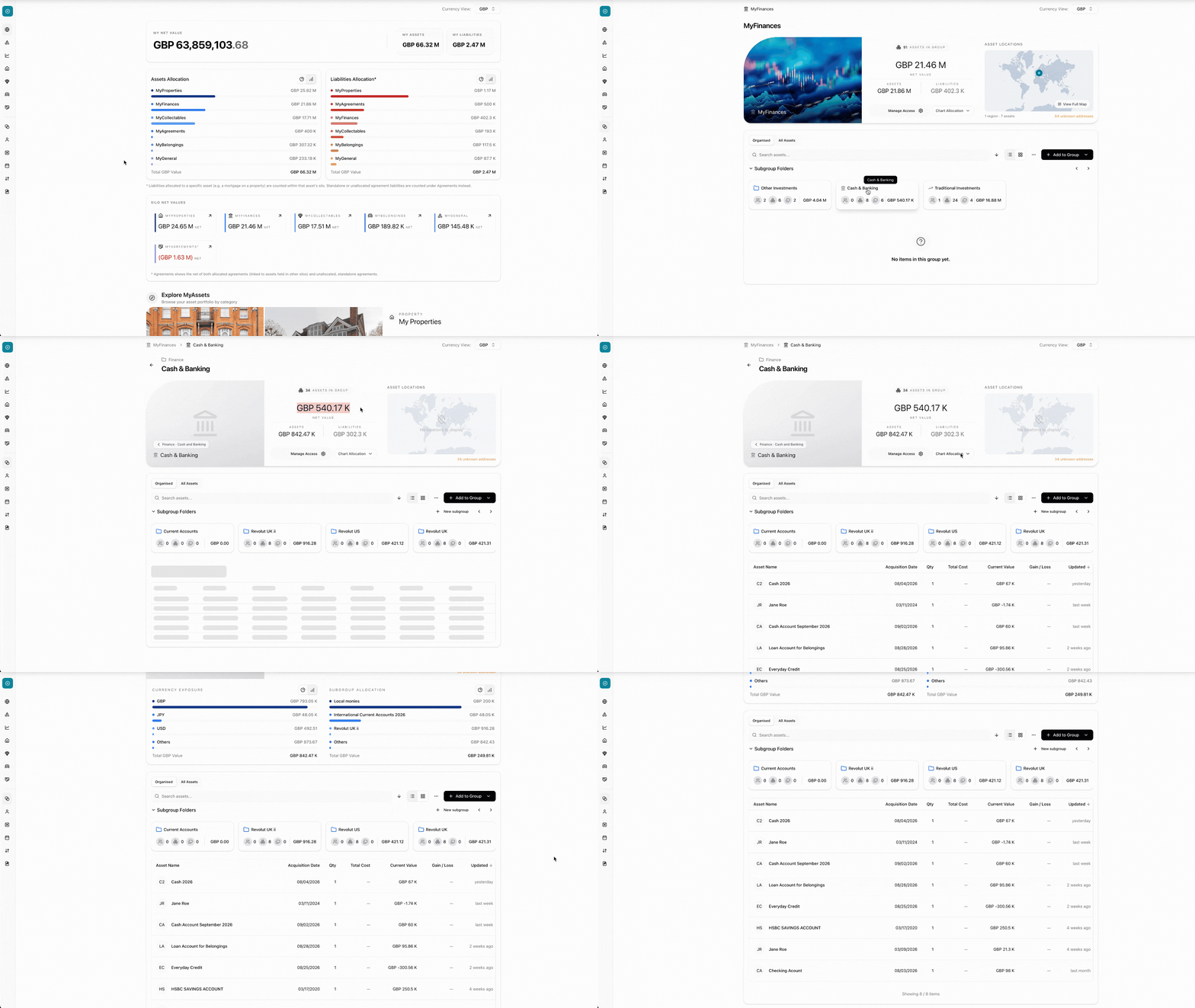
After adding an account, it will appear under the Cash & Banking Subgroup Folder. Follow these steps to locate it:
- Select the MyFinances icon from the left navigation panel.
- Under Subgroup Folders, select Cash & Banking.
The Cash & Banking Dashboard will display an overview of the user’s banking assets, including the following information:
- Asset List - shows the list of bank accounts and their corresponding details, including acquisition date, current value, and last update.
- Currency Exposure - shows how assets are distributed across different currencies.
- Net Value - shows the value after deducting total liabilities from total assets.
- Subgroup Allocation - breaks down asset value across different subgroups.
- Total Asset Value - displays the combined value of all assets held within cash and banking.
- Total Liabilities - shows the combined value of outstanding debts under cash and banking.
5. Create Subgroups to Organise Bank Accounts
Do you have multiple accounts at the same bank or accounts you want to organise by currency, account type or another category? MyAssets allows users to group banking assets based on their preferences, helping keep related accounts together in one place.
To organise bank accounts into groups, follow these steps to create Subgroups:
- Select the MyFinances icon from the left navigation panel.
- Under Subgroup Folders, select Cash & Banking.
- Select New subgroup.
- Enter the Subgroup Name.
- Select Create Subgroup to confirm the action.
- From the asset list, drag and drop the relevant asset into the newly created subgroup folder.
Following these steps allows users to organise bank accounts into preferred categories, making related accounts quick to locate and manage.
Learn More: How To Find Your Personal Net Worth: What To Include And How MyAssets Helps
Bank Account Tracking: Bringing Scattered Accounts Into One View
Managing multiple bank accounts can leave financial information scattered across different banks and platforms. From accounts held across different banks to savings stored in digital wallets, a bank account tracking app can bring financial information together, providing a consolidated view of banking assets in one place.
MyAssets provides a centralised way to track all bank accounts in one app. With features such as importing multiple bank accounts, a Cash & Banking Dashboard, and the ability to organise accounts into groups, MyAssets streamline consolidating banking information and organising their finances.
Whether users want to connect their bank account or manually enter account details, MyAssets provides flexible options for adding and tracking banking assets. By bringing account information together, users can spend less time switching between platforms and more time managing their accounts.
Track My Bank Account: Frequently Asked Questions
1. Is there a single app that can track all my bank accounts?
Yes, a financial aggregation app like MyAssets can consolidate bank accounts from multiple providers, allowing users to track balances and monitor their banking assets from a centralised dashboard.
2. How to keep track of multiple bank accounts?
Individuals can track multiple bank accounts using a spreadsheet for manual record-keeping or a bank account tracking app for a more streamlined approach, such as connecting accounts, monitoring balances, and managing finances in one place.
3. How to find my bank account number?
Find a bank account number on a bank statement, cheque, online banking app or by contacting the bank. Using an app to track all bank accounts can also keep account details and balances consolidated for quick reference.
MyAssets: Bringing All Your Assets Together in One App
What starts as a simple search for a bank account number or a quick balance check can become frustrating when records are scattered across different platforms, paperwork goes missing, and documents are lost permanently. This dilemma raises the question: is there a better way to track all my bank accounts in one place?
The answer is simple: MyAssets. It brings account details and balances together in one platform, helping users spend less time searching for accounts
Go Beyond Bank Accounts: Track All Assets
MyAssets takes this approach further by helping users consolidate all forms of assets, including:
- Bank Deposits - current accounts, savings accounts, and other bank deposits.
- Belongings - furniture, electronics, vehicles, jewellery, and more.
- Cash - cash held outside bank accounts.
- Credit - credit cards and other credit accounts.
- Collectables - art, watches, collector sneakers, and other collectables.
- General Assets - business interests, precious metals, intellectual property and other assets.
- Other Investments - shares, warrants, options, and percent of company.
- Properties - owned and rental properties.
- Traditional Investments - stocks, crypto, and cash equivalents.
Having these assets documented in one place gives users a clearer understanding of what they own and how their holdings are distributed.
Create a Shared View of Your Assets
Managing assets is rarely a solitary endeavour, yet sharing sensitive financial data often poses security risks. With MyAssets’ Delegates features, you have control over account permissions.
The permissions for Delegates include:
- View: allows Delegates to view assets.
- Edit: allows Delegates to edit and view assets.
- Admin: allows Delegates to view, edit, and delete assets.
In this way, MyAssets ensures that data remains protected when managing sensitive information with others.
Bring your entire assets together and start exploring the MyAssets platform for FREE.